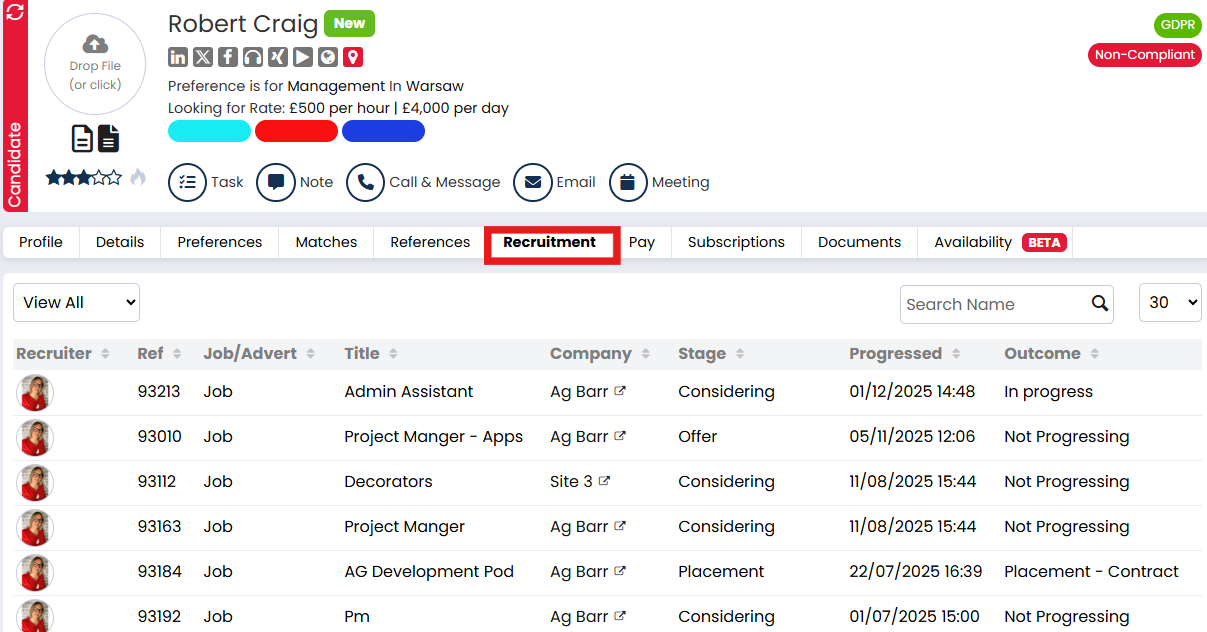
The Recruitment tab gives you a quick, consolidated view of every job the candidate has been part of. This helps you track how far they progressed in each workflow and makes it easier to revisit or follow up on past applications.
What You’ll Find in the Recruitment Tab
When you open the Recruitment tab on a candidate record, you’ll see a list of all the jobs they’ve been linked to through the recruitment workflow.
Each entry displays:
-
Job Title – with a clickable link to open the job record
-
Workflow Stage – the stage the candidate is currently in or the final stage reached
- Progressed - See the date/time the candidate was last updated in the job workflow
-
Status – whether the candidate is still active in the process, placed, or no longer being considered
Why It’s Useful
-
Track a candidate’s full journey across different jobs
-
Easily jump to job workflows to see who else is being considered
-
Spot patterns in candidate performance or recurring clients
-
Keep historical visibility, even if the candidate is archived