AmiAI is an AI-powered recruitment assistant that helps recruiters screen candidates through automated telephone conversations.
By integrating AmiAI with Firefish, you can connect your application process with automated candidate screening, helping your team gather useful information from applicants before deciding who to progress.
Quick Jump to:
- What is AmiAI?
- Available Features
- How to Set Up the AmiAI Integration
- Configuring Your Candidate Screening
- How Automated Candidate Screening Works
- Reviewing Candidate Screening Results
- Viewing Candidates in Firefish
- Using AmiAI
What is AmiAI?
AmiAI is an AI-powered voice recruitment assistant designed to help recruitment teams manage high volumes of candidate applications.
Rather than requiring recruiters to manually telephone every applicant, AmiAI can contact candidates automatically and ask screening questions based on the requirements of the role.
It can help your team gather information about candidates' experience, availability, suitability and eligibility before progressing them further through the recruitment process.
When connected with Firefish, AmiAI can help bring this screening information into your existing recruitment workflow.
Available Features
AmiAI offers several features to help recruiters manage candidate screening:
- Automated Candidate Calls: Contact applicants automatically after they apply for a job.
- Candidate Screening: Ask questions based on the requirements of the vacancy.
- 24/7 Screening: Contact candidates outside normal office hours when configured to do so.
- Candidate Qualification: Assess responses against the screening criteria configured for the role.
- Screening Results: Capture information from conversations to help recruiters review applicants.
- Interview Scheduling: Arrange interviews for suitable candidates where automated booking has been configured.
- Firefish Integration: Connect candidate screening information with your Firefish recruitment workflow.
How to Set Up the AmiAI Integration
Before getting started, you'll need an active AmiAI account and an integration connection between AmiAI and Firefish.
Step 1: Arrange Your AmiAI Account
Contact AmiAI to arrange your account and confirm the screening processes you'd like to use.
During onboarding, you'll need to discuss which vacancies should use automated screening, what information AmiAI should collect and how candidates should be progressed after their conversations.
Step 2: Connect AmiAI with Firefish
Your Firefish Super User and AmiAI onboarding team will need to configure and authorise the connection between the two platforms. To do this, you will need to enable the integration profile in Firefish.
- In Firefish, navigate to Settings > Integrations.
- Locate the AmiAI integration.
- Select Enable to activate the integration.
- Once enabled, a Client ID and Client Secret will be generated.
- Copy both credentials to use when connecting AmiAI.
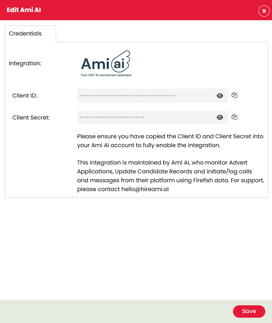
Once the connection is established, confirm that AmiAI can access the relevant application information and return the agreed screening results to Firefish
Configuring Your Candidate Screening
Before you begin automatically screening candidates, you'll need to configure the questions and qualification requirements for your vacancies in AmiAI.
These can be tailored to the information your recruiters need to gather from applicants.
Depending on the role, you might want AmiAI to ask about:
- Relevant experience and qualifications
- Availability and potential start dates
- Location and willingness to travel
- Shift preferences or working hours
- Role-specific requirements
- Eligibility and compliance information
For example, if you're recruiting care workers, you may want to ask about relevant care experience, qualifications, shift availability and any required checks.
Your AmiAI onboarding team can help configure the screening questions and qualification criteria for your recruitment process.
How Automated Candidate Screening Works
Once AmiAI has been configured, it can begin screening candidates as part of your application process.
Step 1: AmiAI Contacts the Candidate
Where automated screening is enabled for the vacancy, AmiAI can initiate a telephone call to the applicant.
During the conversation, AmiAI introduces the screening process and asks the questions configured for the role.
The candidate can respond naturally to the questions, allowing AmiAI to gather additional information beyond what was provided in their initial application.
This helps recruiters collect key details without having to arrange an initial screening call with every applicant.
Step 2: AmiAI Processes the Screening
Once the conversation has finished, AmiAI processes the candidate's responses against the screening criteria.
Depending on your configuration, this can help identify candidates who meet the requirements of the vacancy and those who may need additional review.
The resulting information can then be used by your recruitment team to decide the next steps.
Reviewing Candidate Screening Results
You can review completed screening activity within AmiAI.
The platform provides screening outcomes that help recruiters understand the information gathered during candidate conversations.
Depending on your configured screening process, this may include:
- The candidate's screening status
- Responses to role-specific questions
- Information about their experience and availability
- Their suitability against the configured requirements
- Any follow-up actions identified
Recruiters should review the information alongside the candidate's application and experience before deciding whether to progress them.
Viewing Candidates in Firefish
Candidates who apply through a Firefish-hosted recruitment website can be reviewed through the usual Firefish application workflow.
Reviewing Applications
- Log in to Firefish.
- Open the relevant Job Advert.
- Navigate to the Applications tab.
- Locate the candidate you want to review.
- Open their application or candidate record.
From here, you can review the candidate's details, CV and application information.
Where the AmiAI integration has been configured to return screening information to Firefish, your team can also use the synchronised results as part of their review.
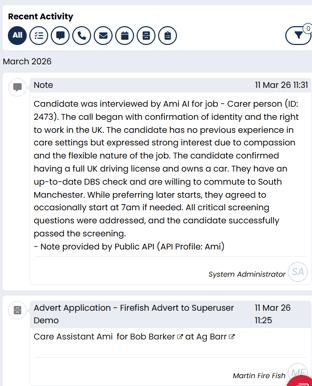
The exact information displayed, and where it appears, will depend on the agreed integration configuration.
Using AmiAI
Once your integration and screening processes are configured, AmiAI can form part of your everyday candidate application workflow.
For vacancies using automated screening, the typical process is:
- A candidate applies: The applicant submits their details through your recruitment website or another supported application route.
- AmiAI begins screening: The platform contacts the candidate according to your configured screening rules.
- The candidate answers questions: AmiAI collects the information required to assess their suitability for the role.
- Screening results are recorded: The candidate's responses and assessment are available for review in AmiAI.
- Your team reviews the outcome: Recruiters use the screening information alongside the application to decide whether to progress the candidate.
- The recruitment process continues in Firefish: Your team can manage the candidate through the appropriate job workflow.
By using AmiAI alongside Firefish, recruiters can reduce time spent conducting repetitive initial screening calls and focus their attention on candidates who require further assessment or personal engagement.
For more information about AmiAI, visit www.hireami.ai or contact your Firefish Success Champion.