RecruitPro is a contractor management and back-office platform that helps recruitment agencies manage contracts, timesheets, payroll and invoicing.
By connecting RecruitPro with Firefish, your agency can transfer relevant contractor placement information between the two systems, reducing the need to enter the same details multiple times.
Quick Jump to:
- What is RecruitPro?
- Available Features
- How to Set Up the RecruitPro Integration
- How to Use the RecruitPro Integration
- Managing Placement Information
What is RecruitPro?
RecruitPro is a back-office platform designed for recruitment agencies managing temporary and contract workers.
It brings contractor management, compliance, timesheets, payroll and invoicing together in one system, helping agencies manage the processes that follow a successful placement.
The Firefish integration connects your recruitment and placement information with RecruitPro, allowing your team to manage recruitment activity in Firefish while using RecruitPro for the relevant back-office processes.
Available Features
RecruitPro provides a range of tools to help recruitment agencies manage their contractor operations, including:
- Contractor Management: Manage contractor information and assignments.
- Client Management: Maintain client information, contracts and associated billing details.
- Contract Management: Record contract dates, rates, working arrangements and related documentation.
- Timesheet Management: Capture hours worked, including standard hours and overtime.
- Payroll and Invoicing: Support contractor payments and client billing processes.
- Compliance Management: Track documentation and requirements associated with contractor assignments.
- Firefish Integration: Transfer supported placement and candidate information from Firefish into RecruitPro.
How to Set Up the RecruitPro Integration
Before getting started, you'll need an active RecruitPro account and access to your Firefish integration settings.
Step 1: Enable RecruitPro in Firefish
Your Firefish Super User will need to enable the integration and generate the credentials required to connect the two systems.
- Log in to Firefish.
- Navigate to Settings > Integrations > Pay & Bill.
- Locate the RecruitPro integration.
- Select Enable.
- Once enabled, a Client ID and Client Secret will be generated.
- Copy these credentials to complete the connection.
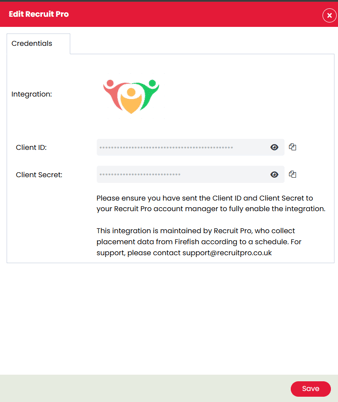
Important: Keep your Client ID and Client Secret secure and only share them with your authorised RecruitPro contact.
Step 2: Share Your Credentials with RecruitPro
Once you've enabled the integration:
- Contact your RecruitPro account manager or onboarding team.
- Confirm that you want to connect RecruitPro with Firefish.
- Securely provide the Client ID and Client Secret generated in Firefish.
- The RecruitPro team will use these credentials to configure the connection.
Once the connection has been configured, RecruitPro can access the supported information required for the integration.
How to Use the RecruitPro Integration
Once the candidate is ready to be placed:
- Open the relevant Contract Placement in Firefish.
- Navigate to the Pay Details tab.
- Check that the payment type, engagement type and supplier are correct for the assignment.
- Review the agreed pay and charge rates.
- Complete the remaining placement information.
- Select Place and confirm the placement.
Once the placement has been confirmed, the supported placement information can be made available to RecruitPro through the integration.
Managing Placement Information
Keeping the placement details in Firefish accurate is important for the information used by RecruitPro.
Depending on the supported integration configuration, this can include:
| Information | Where it is managed in Firefish |
|---|---|
| Candidate information | Candidate Record |
| Candidate payment details | Candidate Record > Pay |
| Placement start and end dates | Contract Placement |
| Job title and assignment information | Contract Placement |
| Pay and charge rates | Placement > Pay Details |
| Supplier information | Supplier Directory and Pay Details |
When changes are made to an existing assignment, make sure the relevant Firefish records are updated.
For example, if a contractor's end date or pay rate changes, update the relevant placement details in Firefish.
The handling of subsequent changes, extensions and terminations should follow the supported RecruitPro integration configuration.
For more information about RecruitPro, visit recruitpro.ie or contact your Firefish Success Champion.