Once your standard temp rate cards are built, you attach them to the companies you're placing temps with.
From the company record, you can add a standard rate card as-is, customise it for that company, or use parent company rates so related companies can share the same rates.
Contents
- Adding a rate card to company
- Editing a rate card
- Linking a rate card
- Editing linked rates
- Unlinking a rate card
Adding a rate card to a company
On the company record, go to Terms > Temp and use the Add Rate Cards setting. This is a multi-select dropdown listing the standard rate cards you've configured in settings.
Each rate card you select is added to the table below as a read-only copy of the standard version.
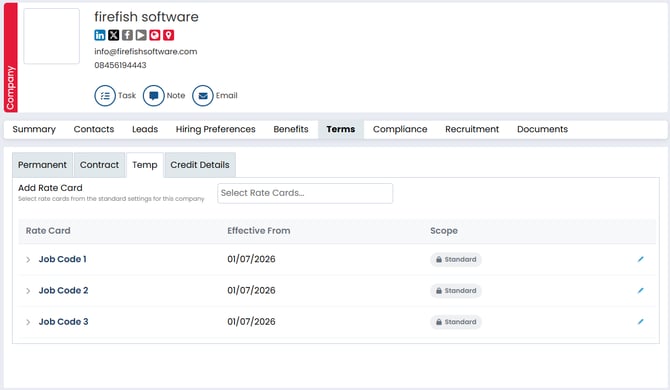
The table shows one row per rate card, with:
- Rate card — the name.
- Job code — the code the rate card applies to.
- Effective from — the rate card's effective-from date.
- Scope — Standard by default, changing to Custom or Linked once you edit or link it.
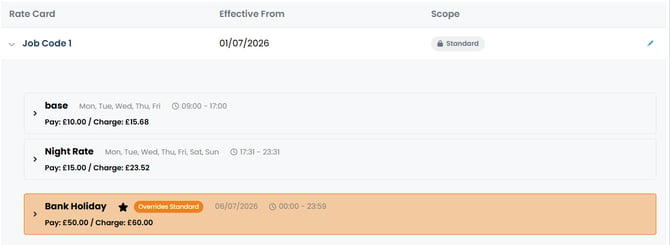
Open any rate card to see a read-only view of its rate details, including any modifiers on the rate.
Editing a rate card
Select Edit on a rate card to open a side panel with two tabs: Standard and Custom.
- Standard shows the current rules, configuration and rates as read-only.
- Custom allows you to make the rate card specific to that company.
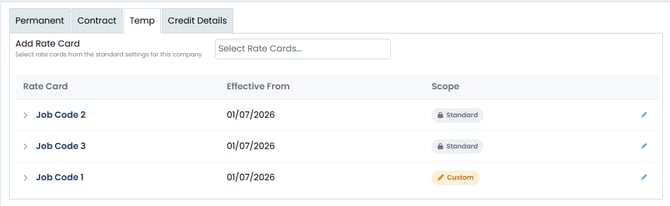
On the Custom tab you can edit the rules and configuration, edit the rates and modifiers, add new rates and modifiers and schedule changes for the rate. When you save, the rate card switches from the standard rates to your custom rates for that company, the table clearly flags it as Custom, and an entry is added to the company's recent activity.
Linking a rate card
If you work with a parent company and its child companies, you can share rates instead of rebuilding the same rate card for each company.
The parent company's rates are shared with linked child companies. This allows you to manage rates for the parent and its linked children from one place.
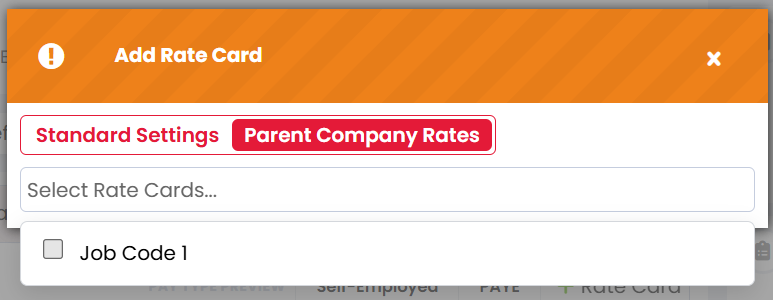
On the child company, when adding a rate card, you can choose to add rate cards from Standard Settings or Parent Company Rates.
Editing linked rates
Edit the rate card on the parent company to change rates, change modifiers or add new ones.
Because linked companies share the parent company's rates, changes made to the parent's rate card are shared with the linked child companies.
If a single child company needs different rates, it can be unlinked so that it has its own copy to edit.