How does a candidate apply for a job?
A candidate applies by finding a role on your jobs page, clicking Apply on the advert, completing the application form, and clicking Submit. They will receive a confirmation email once their application has been received.
Candidates complete the application in the following order:
- Search for a role on your jobs page and click Apply on the advert page.
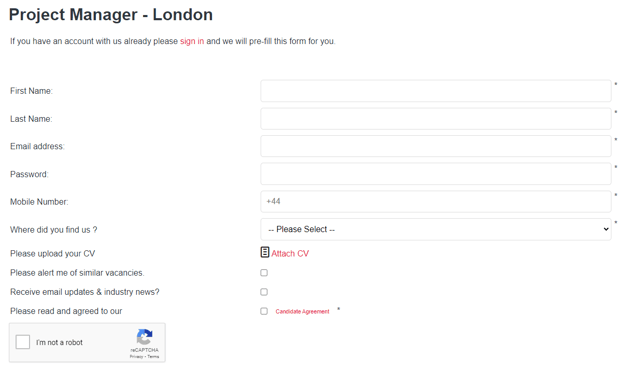
- Fill in their details and upload their CV on the application page. Returning candidates can sign in to pre-fill their information automatically.
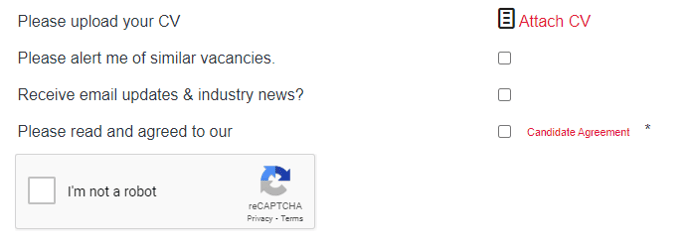
- Write a cover note, opt in to email updates if desired, and accept the candidate agreement.
- Click Continue to proceed.
- Answer any mandatory pre-screening questions included in the advert.
- Click Submit to complete the application.
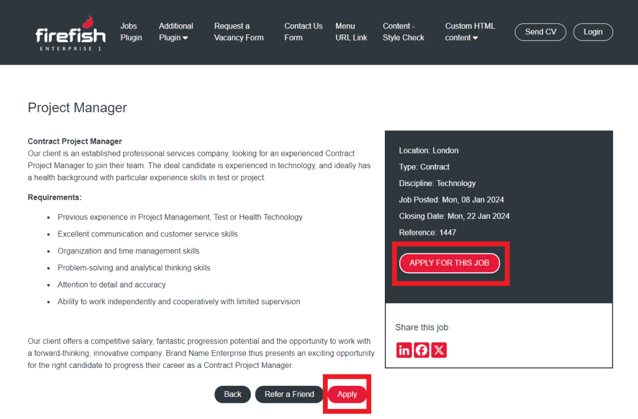
This brings them to the application page, where they can easily fill in their details and upload their CV. If they’ve registered before, they can just sign in with a quick click, and voilà— all their information will magically pre-fill in the fields!
If you’ve included pre-screening questions in the advert, this is where they come into play. Candidates will need to answer these mandatory questions, and keep in mind: if they select an unexpected answer, they’ll receive an auto-reject email within 24 hours.
What confirmation does a candidate receive after applying?
After clicking Submit, the candidate receives a confirmation email acknowledging that their application has been received.
How do you review applications once submitted?
Once a candidate has applied, their details are available for you to review and process through the advert tab or your dashboard.