- What Fields are Populated?
- How Accurate is the Parser?
- Managing Your Parsed Skills List in Properties
Firefish will process any CV added to a candidate record using artificial intelligence (AI) to structure and populate candidate information into the main record profile.
CVs are parsed automatically whenever a readable document is added to a candidate record. This includes all registration methods, direct apply, and manually uploading a document. Supported file formats include Word (.doc/.docx) and PDF — note that scanned image-based PDFs cannot be read by the parser.
What Fields are Populated?
The AI CV Parser populates all core profile fields that are currently blank. The fields it populates include:
- Personal Details
- Availability
- Social
- Contact
- Candidate Summary
- Recruiter Summary
- Education
- Certifications
- Employment History
- Skills
Where a field offers a dropdown selection, Firefish will attempt to match information on the CV to one of your dropdown values – if a match cannot be determined by the AI based on the information available, the dropdown will not be populated.
For example, if a candidate lists a certification that doesn't exist in System Configuration > Properties > Certifications, the parser will skip it. To capture it, add the value to your Properties list first.
How Accurate is the Parser?
The AI Parser relies on contextual information in a CV to structure and populate the data against the record.
The accuracy and reliability of data capture relies on the quality of the CV – this includes the way the document is laid out, the information that can be extracted and the available relevant dropdown options in Firefish.
CV Parsing is a background process, so you should check back in on your record after adding a new CV document.
The speed of the parser will depend on the size and complexity of the CV. Depending on the amount of data being processed, you may notice that the parser populates your candidate record in stages.
In the record header, you'll see document icons - the colour of these icons tell you what stage CV processing is at:
| Orange |  |
CV is awaiting processing |
| Blue |  |
CV has processed but contains less than 200 words |
| Black |  |
CV has processed successfully |
| Red |  |
CV has failed processing |
If a CV fails processing, this is typically caused by one of the following:
- A corrupted or unreadable document
- An error during the processing job
- A scanned image PDF, or a PDF where content is embedded in images rather than text
Managing Your Parsed Skills List in Properties
The Firefish AI CV Parser uses a curated Skills list in System Configuration > Properties > Candidates, with a maximum of 150 values. This list drives how skills are linked, ranked, and surfaced across candidate records.
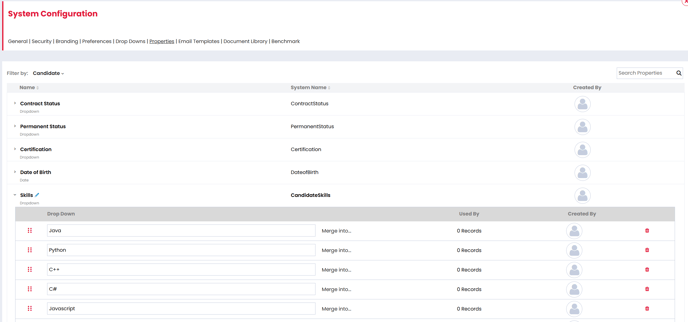
Why it matters:
The AI will prioritise and match skills from your Properties list to ensure clean, consistent data for ranking, reporting, and searchability. However, the parser will also suggest additional skills it believes are worth highlighting - even if they’re not on your list. These suggested skills are searchable and rankable, but may vary in naming and won’t scale as reliably as linked ones from your controlled list.
💡 Top Tip: Understanding Skill Highlights in CV Parsing
When Firefish parses a CV using our AI tool, it highlights two types of top skills:
-
Grey Highlight = A skill explicitly listed by the candidate in their CV.
-
White Highlight = A skill inferred by the parser based on the candidate’s experience or context.
Both are considered "top skills" and help you quickly assess a candidate’s strengths—even if they haven’t listed every skill directly.
What to Include
Focus your list on:
- Technical Skills – e.g. “Python”, “AutoCAD”, “Google Ads”
- Role-Specific Skills – e.g. “Pipeline Management”, “Care Planning”, “Bid Writing”
- Measurable Skills – Anything that can be objectively demonstrated or quantified in a CV
Avoid soft skills like “Communication” or “Self-starter” as these won’t add value to search or ranking.
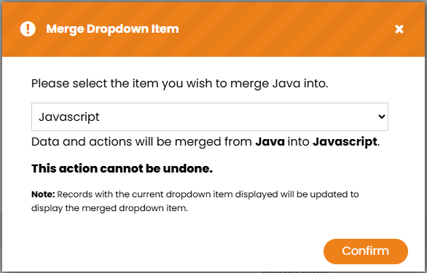
Use the ‘Merge Into’ option in dropdowns to clean duplicates and standardise terminology:
Need inspiration? Use an AI prompt to build your Skills list:
"Act as a recruitment consultant working in the [industry] sector. Your task is to produce a clean list of 100 technical, role-specific, and objectively measurable skills that typically appear on CVs across roles such as [Job Titles].
Only include skills that are:
- Clearly demonstrable on a CV (e.g. 'SQL Query Writing', not 'Good Communicator')
- Free from duplicates, overlaps, or soft skills
- Formatted as single-line dropdown entries (no descriptions)
Output the list as a clean bullet point list with no additional explanation or commentary."