Firefish currently integrates with the following Saongroup job boards:
-
Irish Jobs
-
Jobs.ie
-
NI Jobs
-
NI Jobs Finder
-
Recruit NI
Setting up your integration with one or more of these job boards is quick and straight forward.
Adding a Job Board
Although there are differences between each Saongroup Job Board (for example industries and sectors), the set up process is identical. Here we will use the example of setting up NI Jobs.
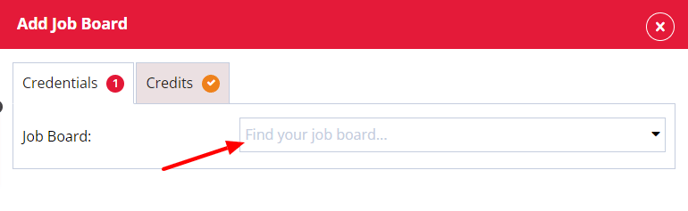
To add a Saongroup Job Board to your job board multi-posting, a Super User can go to Settings > Integrations > Job Boards then click Add.
Starred fields are mandatory and must be completed in order to set up the integration. A red status symbol will indicate tabs that have mandatory fields to complete and the number of mandatory fields for that tab.
You'll need your Saongroup job board Username and Password which you can request from your chosen job board account manager.
Credentials
Select the Saongroup Job Board from the options provided in the Job Board drop down:
Firefish Profile Name
Give these job board settings a name - this will help identify different integrations with the same job board.
Use direct apply URL?
Choosing a direct apply URL means candidates will be directed back to your website when applying for an advert posted to a Saongroup job board.
You may need to contact your account manager to ensure this is enabled.
Contact Information
This choice will depend on whether you wish for the email of the recruiter listed on the advert to be used, or the email of the company held within system settings.
Default Fields
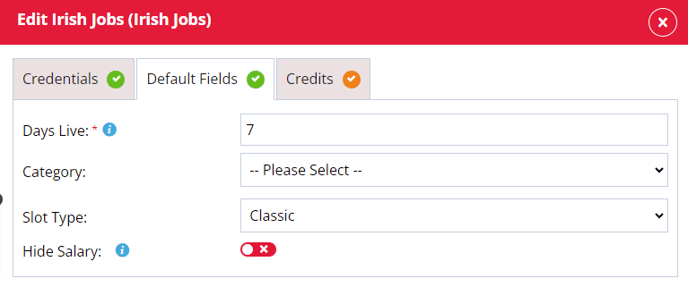
The Days Live setting can be found in the Default Fields tab:
Live Days
Choose the default number of days an advert should be posted to the job board for. This can be changed per advert.
Credits
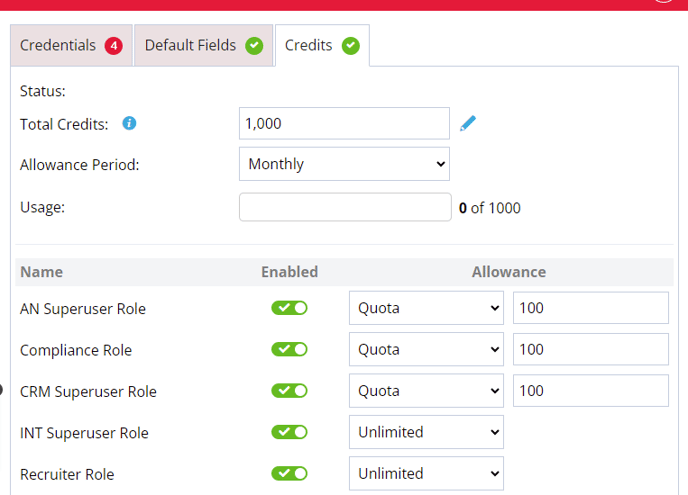
In this tab you will be able to set up a limit of the number of credits being used per user or have unlimited postings to the job board:
Status
- Status: Displays the date the current allowance period began, or the date the total credits were last reset.
- Total Credits: Set to unlimited by default. You can enter the number of available credits from the job board, or set your own limit.
- Allowance Period: Set to Monthly (credits reset at the start of each new month) or Weekly (credits reset on the same day as the start of the business week).
- Usage: When an advert is posted to a job board, it is registered here to show how many adverts have been posted against the total credits.
- Users: Leave set to Unlimited to allow a user to post as many adverts as they want (or until credits run out). Set a quota to restrict postings — the default is 5, but you can change this to any limit you choose. Toggle a user Off to remove their ability to post to this job board, or On to allow posting.
Total Credits
Is set to unlimited by default and if you want to add the number of available credits from the job board or set your own limit you can.
Allowance Period
The allowance period can be set to Monthly or Weekly. When set to Monthly the credits will reset the allowance at the beginning of a new month. When set to Weekly the credits will reset on the same day as the start of the business week.
Usage
When a advert is posted to a job board this will register in the usage to show how many adverts have been posted against the total amount of credits.
Users
In this column you can leave the user with the ability to post Unlimited adverts as they want to the job board or until the job board credits run out. You can also set a quota and when selected the default amount is set to 5 but can be changed to a limit you want to set. In this column you can also remove a users ability to post to this job board by toggling the user to the off position or you can toggle the switch on to allow a user to post to a job board.
Checking your Settings
Currently Saongroup does not offer the ability to check that your credentials are correct before posting an advert. The only way to check if you have entered the correct details is to try posting an advert from Firefish. If the details you’ve entered in the Job Board Settings are incorrect, you’ll see an error message detailing what has caused the post to fail.
Posting to a Saongroup Job Board
How do I post an advert to a Saongroup job board?
To post an advert to a Saongroup job board from Firefish:
- Open the advert and click the Reach tab.
- Select the Saongroup job board you want to post to from the list of available job boards.
- Complete all mandatory fields in the posting modal (marked with an asterisk).
- Click Post. A new action is added to the Recent Activity tab confirming a successful post.
You'll see all the available job boards listed. Click on the Saongroup job board you would like to post from.
The posting modal for that Saongroup Job Board will now open; any fields that are mandatory will display an asterisk:
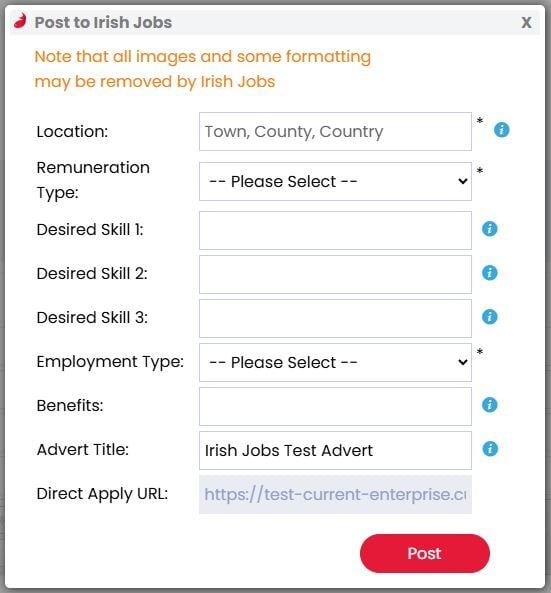
Complete the available fields and, once you're satisfied with your selections, click Post. A new action will be added to the Recent Activity tab of the advert for successful posts.
Candidate Application Journey
How do candidates apply after a Saongroup job board posting goes live?
After completing your Firefish setup, contact your Saongroup account manager to confirm setup on their side is also correct. There are two options for receiving applications:
Direct Apply
If you have ticked the option in your Firefish job board settings to Use direct apply URL, applicants will be redirected to the advert application form on your Firefish site. Here's a quick video showing the journey for the candidate:
You should confirm with your Saongroup job board Account Manager that you are set up for the option "Third Party Site".
When using direct apply, Saongroup job boards do not automatically pass the applicant CV across and candidates will have to upload this manually during the application process.
Applications with CV
If you do not enable the Direct Apply URL, the other option Saongroup job boards offer is Applications With CV.
This means that any applicants to your adverts will be emailed directly to the email address you have selected with that Saongroup job board, and these will have the CV automatically attached.
You should confirm with your Saongroup account manager that you are set up for the Applications With CV option.
With this option, applicants will not be redirected to the advert application on your Firefish site.