Talenta, provided by Yo Telecom, is a business communications platform that integrates with Firefish to help recruiters manage candidate and client calls.
With the integration enabled, you can make and receive calls, view caller information from Firefish, and automatically capture call summaries and notes against the relevant candidate or contact record.
Quick Jump to:
- What is Talenta?
- Available Features
- How to Set Up the Talenta Integration
- Making Outbound Calls
- Receiving Inbound Calls
- Adding Call Notes and Tags
- Viewing Call Recordings, Transcripts and Insights
- Benefits of Using Talenta with Firefish
What is Talenta?
Talenta is a business phone system that connects with your Firefish CRM, giving recruiters access to relevant candidate and contact information during calls.
Provided by Yo Telecom, Talenta combines business calling with call recording, transcription and conversation analysis. Yo Telecom also offers wider communications services, including broadband connectivity, IT support and physical handsets.
Available Features
Once the Talenta integration is enabled, you'll have access to the following features:
- Outbound Calling: Make calls to candidates and contacts directly from Firefish.
- Inbound Caller Identification: See who's calling and open their associated Firefish record.
- Caller Information: View details such as job title, last contact date and data status.
- Call Notes: Capture conversation summaries, key points and next steps against the relevant Firefish record.
- Call Recordings and Transcripts: Access recordings and full transcripts stored in Talenta through links in your Firefish notes.
- Conversation Insights: Review sentiment analysis and coaching information within Talenta.
How to Set Up the Talenta Integration
Before getting started, you'll need an active Talenta account with Yo Telecom.
Step 1: Enable the Integration in Firefish
- Ask your Firefish Super User to navigate to Settings > Integrations.
- Locate the Talenta integration.
- Select Enable to activate the integration.
- Once enabled, a Client ID and Client Secret will be generated.
- Copy both credentials to use when connecting your Talenta account.
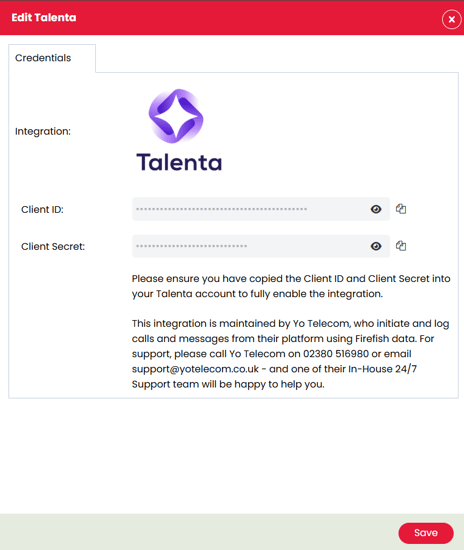
Step 2: Connect Firefish to Talenta
- Log in to your Talenta account.
- Navigate to the Integration Settings in Talenta.
- Locate the Firefish integration.
- Enter the Client ID and Client Secret copied from Firefish.
- Save the settings to complete the connection.
Once connected, Talenta will be able to access the relevant Firefish information and log call notes against your candidate and contact records.
Making Outbound Calls
With the integration active, you can make calls to candidates and contacts directly from Firefish.
- Open the relevant Candidate or Contact record in Firefish.
- Select Call & Message and choose the phone number you'd like to call.
- Talenta will open a pop-up window to handle the call.
- Make your call using Talenta.
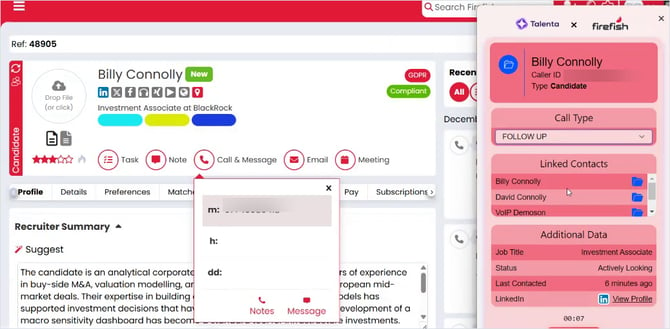
During your call, Talenta displays information about the person you're speaking with, including any matching Firefish records.
If a phone number is associated with multiple records, you'll be able to see the linked contacts and identify the correct person.
Receiving Inbound Calls
When a candidate or client calls your Talenta number, an incoming call notification will appear.
Talenta uses the incoming phone number to identify matching records in Firefish.
- When an incoming call is received, the Talenta pop-up will appear.
- Answer the call through Talenta.
- Review the caller's details and any matching Firefish records.
- Select the linked record to open the person's profile in Firefish.
The caller information can include:
- Candidate or contact name
- Job title
- Last contact date
- Data status
- A link to the associated Firefish record
This gives you additional context about the caller and makes it easier to access their information without manually searching Firefish.
Adding Call Notes and Tags
Once you've finished a call, Talenta will display a pop-up where you can review and add further details about your conversation.
You can:
- Add additional call notes.
- Select the appropriate Call Type.
- Apply call tags to help categorise the conversation within Talenta.
Important: You must select a Call Type before your notes can be submitted to Firefish.
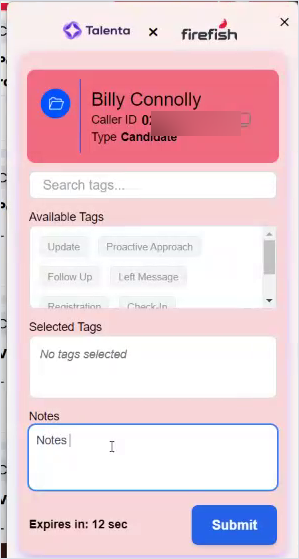
Once you've selected a Call Type and submitted your notes, a communication note will be created against the associated candidate or contact record in Firefish.
The note includes:
- Key Points: A summary of the conversation.
- Next Steps: Actions or follow-ups identified during the call.
- Call Review Links: Links to access the recording, transcript and additional conversation details in Talenta.
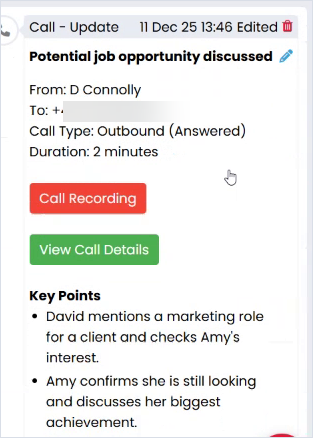
This helps keep your communication history up to date without having to manually write out everything discussed during the call.
Viewing Call Recordings, Transcripts and Insights
Once your call notes have been submitted, you can access additional details about the conversation directly from the note in Firefish.
Reviewing Recordings and Transcripts
- Open the relevant candidate or contact record in Firefish.
- Locate the communication note created by Talenta.
- Select the link to view the call recording or additional details.
- The call review page will open in Talenta.
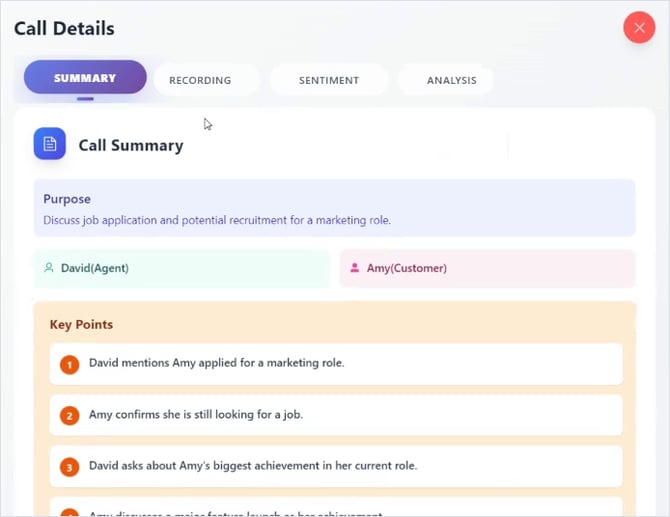
Within Talenta, you'll be able to:
- Listen to the call recording.
- Read the full call transcript.
- Review the key points and next steps.
Please note: Call recordings and transcripts are stored within Talenta, not Firefish. The communication note in Firefish provides links to access this information.
Call Sentiment and Coaching Insights
Talenta also provides additional analysis of your conversations to help you review calls in more detail.
These features include:
- Sentiment Analysis: Review the sentiment of the conversation.
- Call Analysis: Access additional insights into what was discussed.
- Coaching Points: View feedback that can help recruiters improve how they handle conversations.
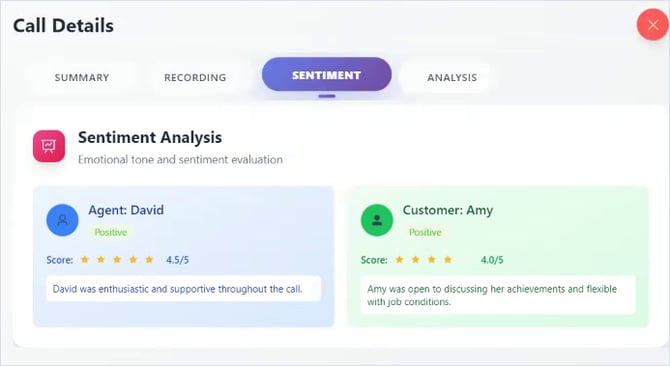
These insights are available within Talenta when reviewing a completed call.
Benefits of Using Talenta with Firefish
The Talenta integration connects your business phone system with your Firefish CRM, helping recruiters keep track of conversations with candidates and clients.
With caller information, automatic call summaries and links to recordings available from the relevant Firefish record, your team can spend less time on manual administration while maintaining an accurate communication history.
For more information about Talenta, visit Talenta or contact your Firefish Success Champion.