Reporting helps you understand how your recruitment business is performing and where improvements can be made.
Firefish captures valuable information across your candidates, contacts, companies and jobs. Using the Reports Dashboard, you can turn this information into useful insights to help you make informed business decisions.
Whether you're a solo recruiter, managing a small team or overseeing a larger recruitment business, here are our recommended reports to help you get started.
I work on my own
When you're working independently, you'll likely have a good understanding of your candidates and live vacancies. However, reporting can help you identify which recruitment activities deliver the best results and where to focus your time and budget.
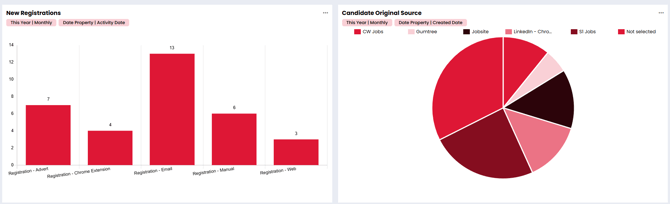
Candidate Original Source
This report helps you understand where your candidates originally came from, including the recruitment channels and sources generating registrations.
Why is this useful?
- Identify which job boards and candidate sources are generating the most candidates.
- Review the effectiveness of your recruitment advertising.
- Make more informed decisions about where to invest your advertising budget.
If you're paying for several job boards, use Candidate Original Source to compare how many candidates each source has generated. This can help you decide which channels are worth reviewing or investing in further.
New Registrations
The New Registrations report helps you monitor new candidates registering with your recruitment business.
Why is this useful?
- Understand how many new candidates are entering your database.
- Review candidate registration activity over time.
- Identify opportunities to engage with newly registered candidates.
Review new registrations each week to understand whether your candidate database is growing and identify candidates who may need follow-up.
Our recommendation: Start by reviewing these reports weekly. They'll help you monitor candidate attraction and make more informed decisions about your recruitment activity.
I've got a small team
As your recruitment business grows, understanding individual and team performance becomes increasingly important.
Alongside candidate attraction reports, you'll want to monitor recruitment activity, sales performance and the progress of opportunities across your business.
Recruitment KPIs
Firefish allows you to track recruitment KPIs and review performance through reporting.
Depending on the activities your team records, useful KPIs might include:
- Business Development (BD) Calls
- CVs Sent
- Interviews
- Other recruitment activities relevant to your team's objectives
Why is this useful?
Monitoring KPIs helps you understand how active your team is, identify areas requiring additional support and review progress against agreed targets.
If a consultant is making plenty of BD calls but generating fewer opportunities than expected, reviewing their activity alongside your sales pipeline can help you identify where further coaching may be beneficial.
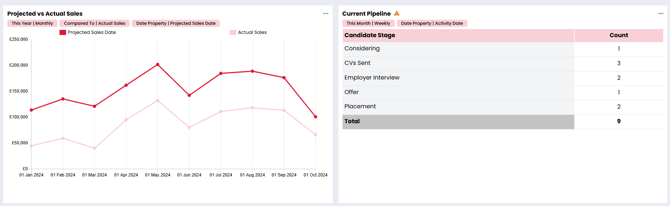
Projected vs Actual Sales
This report helps you review sales performance against projected figures.
Why is this useful?
- Compare expected sales with actual results.
- Identify differences between projected and achieved performance.
- Support sales reviews and future business planning.
Example: During your monthly sales meeting, use the report to review whether your team is achieving its projected sales performance and discuss any significant differences.
Current Pipeline
The Current Pipeline report provides visibility of opportunities within your recruitment pipeline.
Why is this useful?
- Monitor the progress of your recruitment pipeline.
- Understand the opportunities your team is working on.
- Support discussions around upcoming business and sales priorities.
Review Current Pipeline during weekly team meetings to understand what opportunities are progressing and where additional attention may be required.
Our recommendation: Create a shared Reports Dashboard containing your key KPI, pipeline and sales reports. Use this as the basis for weekly team meetings to review performance, celebrate progress and agree priorities for the coming week.
I've got a large team
Managing a larger recruitment business often means overseeing multiple consultants, departments or specialist teams.
At this stage, reporting becomes particularly valuable for understanding overall business performance while also reviewing how individual teams are performing.
You can continue using the reports recommended above, alongside additional reporting tailored to your business structure.
Team Performance and KPIs
Use reporting to monitor the recruitment activities that matter most to each team.
Different departments may have different priorities, so consider tailoring their reporting to the work they carry out.
For example:
- Business Development Teams: Review activities such as Terms Sent and CVs Sent on Spec.
- Delivery Teams: Monitor Interview activity and other recruitment delivery KPIs.
- Management Teams: Review sales performance, pipeline activity and KPIs across the business.
Why is this useful?
Team-specific reporting allows managers to focus on relevant performance measures rather than reviewing the same metrics across every department.
Your BD team might use its weekly meeting to review client development activity, while your delivery team focuses on interviews and recruitment progress.
Advert Performance
The Advert Performance report helps you review how your recruitment adverts are performing.
Why is this useful?
- Understand which recruitment adverts attract candidate engagement.
- Review advert performance across different areas of your business.
- Identify opportunities to improve your recruitment advertising strategy.
If your business recruits across several sectors, reviewing advert performance can help identify where candidate engagement is strongest and where your advertising approach may need reviewing.
Team-Specific Reports Dashboards
For larger recruitment businesses, consider creating separate Reports Dashboards for individual departments or teams.
Firefish supports multiple dashboards, allowing you to organise reporting around different business objectives.
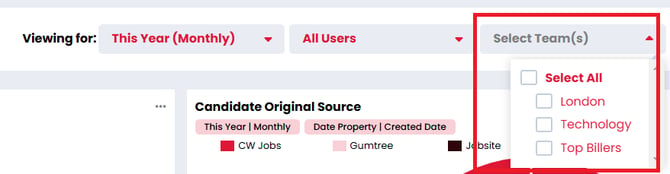
Where supported by your subscription and configuration, team structure filtering can help you review the performance of specific groups.
Dashboard sharing and privacy settings can also help you manage who has access to relevant reporting information.
Why is this useful?
- Give individual teams visibility of the information most relevant to them.
- Support more focused team meetings.
- Help managers understand performance across different parts of the business.
- Reduce the need to review unrelated KPIs.
A recruitment business with separate BD and delivery teams could create a dashboard for each department, allowing the teams to review their own performance and priorities.
Our recommendation: Use dedicated dashboards for individual teams alongside your wider management reporting. Review team performance weekly and use monthly management meetings to assess overall business results.