Firefish Enrich lets your team enrich contact records with verified email addresses and validated phone numbers. To use it, a superuser must enable the feature, grant the correct permissions, and manage the monthly credit package.
- Enable Firefish Enrich
- Set Role Permissions for Firefish Enrich
- View Your Firefish Enrich Package and Remaining Credits
- How Monthly Credits Work
- Firefish Enrich Packages and Pricing
- Auto-Upgrade Package (recommended)
- Manual Top-ups
- Troubleshooting
Enable Firefish Enrich
-
Go to People Configuration.
-
Select Contact settings.
-
Scroll down to the Automation header
- Switch on Enable Firefish Enrich (under the Automation heading).
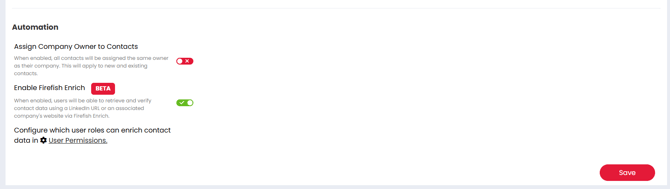
When enabled, the page also shows a link to User Permissions so you can control who can spend credits.
Set Role Permissions for Firefish Enrich
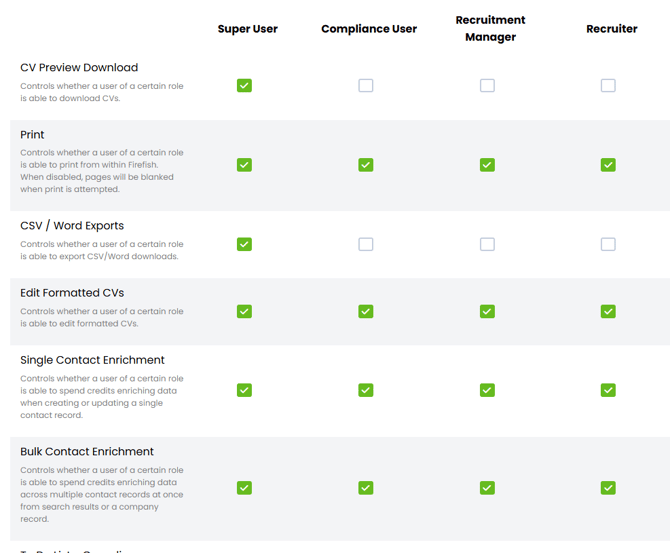
Firefish Enrich permissions are controlled by role and split into two permission types:
-
Single Contact Enrich
-
Bulk Contact Enrich
If a user does not have permission, they will see locked/disabled enrichment options and be prompted to speak to a superuser.
To set permissions, navigate to Settings -> User Management -> User Permissions
View Your Firefish Enrich Package and Remaining Credits
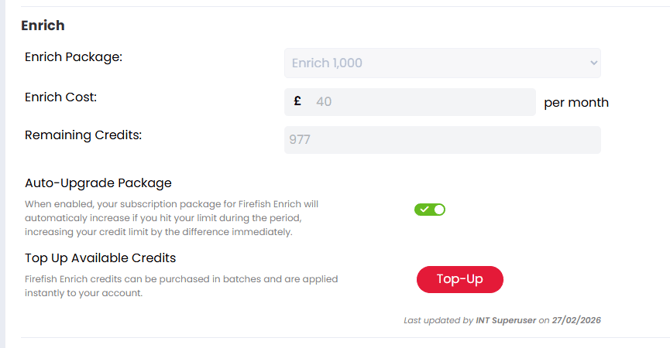
A Firefish Enrich section appears on Account & Billing → Subscriptions, showing your current package, remaining credits, and package cost.
The section includes:
-
Current Package (locked dropdown)
-
Package Cost
-
Remaining Credits (with a “Resets on <billing date>” tooltip)
-
Auto-Upgrade Package toggle (enabled by default)
-
Top-Up button
-
Audit Line (tracks changes)
How Monthly Credits Work
-
Firefish Enrich uses a monthly credit system tied to your billing date.
-
Remaining credits refresh/reset on the billing date each month.
-
Credits are intended to be used within the billing period (they refresh at the end of the period).
Firefish Enrich Packages and Pricing
Firefish Enrich packages are monthly and refresh on your billing date.
Available packages:
| Package credits | Credit equivalent | Price per month |
|---|---|---|
| 500 | 500 emails / 50 phones | £20 |
| 1,000 | 1,000 emails / 100 phones | £40 |
| 2,000 | 2,000 emails / 200 phones | £80 |
| 5,000 | 5,000 emails / 500 phones | £200 |
Credits are consumed per field only when data changes (Email: 1 credit, Mobile/Direct Dial: 10 credits).
Auto-Upgrade Package (recommended)
Auto-Upgrade is enabled by default.
When Auto-Upgrade is on and your site runs out of credits during enrichment:
-
Your package moves to the next tier automatically.
-
The difference in credits between the old and new package is added to your account immediately.
-
Enrichment is not interrupted.
Note: This also means your site will move onto the lowest tier once you run Enrich for the first time (because a package is required to track monthly credits).

Manual Top-ups
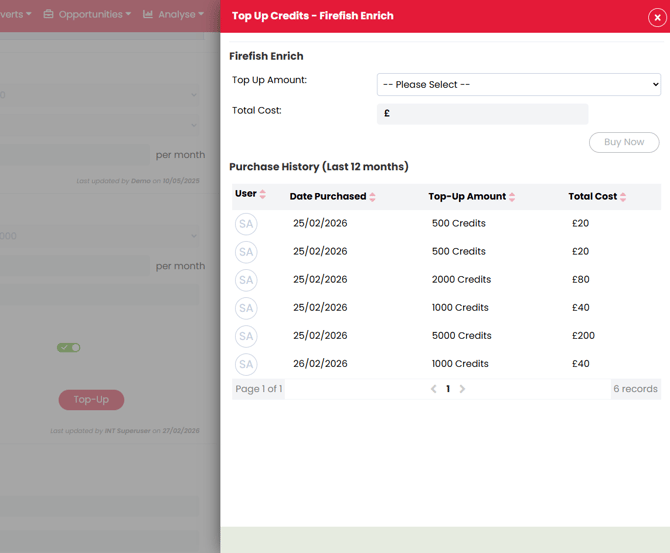
Superusers can purchase additional credit bundles using Top-Up on the Subscriptions page.
The Top-Up side panel includes a purchase history (last 12 months) and applies credits immediately after purchase.
Troubleshooting
Firefish Enrich is missing
-
Confirm Enable Firefish Enrich is switched on in People Configuration → Contact settings.
-
Confirm the user’s role has Single Contact Enrich and/or Bulk Contact Enrich permissions.
Firefish Enrich is greyed out
-
The user does not have permission for that action.
-
Update the user’s role permissions.
Credits have reset unexpectedly
Credits refresh on your billing date, so the remaining balance will reset at the start of a new billing period.
FAQs
Where do I see our Firefish Enrich package and remaining credits?
- As a Super User, navigate to Settings -> Account & Billing -> Subscriptions to see the Enrich Section
When do credits refresh?
-
Credits expire and your total count will reset at the end of your billing period.
Who can enable Firefish Enrich?
-
Only Super Users can unable and manage Firefish Enrich. If you don't have Super User permissions, contact an administrator to enable the feature.
What happens if we run out of credits during enrichment?
- If Auto-Upgrade Package is enabled, your account will automatically move to the next package tier, and the difference in credits are credited to your account instantly. If this setting is disabled, or you're already at our maximum monthly package option, enrichment will be disabled until more credits have been added.
Can we top up credits mid-month?
- Yes - a super user can purchase additional top-ups at any time by navigating to Settings -> Account & Billing -> Subscriptions and clicking the "Top-Up" button. Any additional credits purchased will expire at the end of your billing cycle along with your monthly credits.
Why is Enrich greyed out for some users?
- Ask a Super User to check if you have permission to use the feature, and that there are enough available credits on your account.