Firefish Enrich helps keep your database ready for outreach by enriching contacts with verified email addresses and validated phone numbers. When enrichment runs, Firefish updates the contact fields, adds confidence icons, and logs the result in the contact’s activity feed.
What Firefish Enrich updates
Firefish Enrich can populate and update contact records with:
-
Email
-
Mobile
-
Direct Dial
- Job Titles
Phone numbers are assigned accurately based on validation.
What is needed to Enrich a Contact
Before you can submit a contact for enrichment, you will need to ensure that you have the following on your contact record:
- A populated First Name and Surname
At least 1 of the following fields also populated:
-
Contact Email - must look like an email address (***@***.***)
-
LinkedIn URL- must look like a LinkedIn URL (linkedin.com/in/***)
-
An assigned Company Record with at least one of the following:
- Correctly formatted Company Name
- Company Website
- Company Email address
Where you can run Firefish Enrich
-
Create Contact side panel: Create & Enrich
-
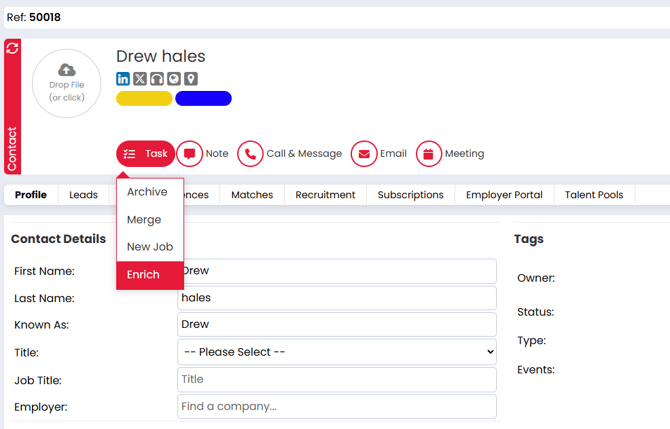
Contact record task menu: Enrich
-
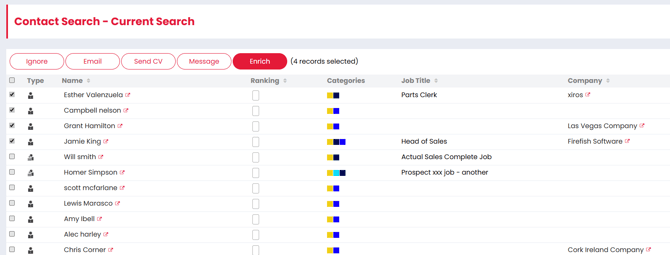
Contact search results: Enrich
-
Company record task menu: Enrich Contacts
Enrich a new contact while creating them
-
Open the Create Contact side panel.
-
Complete the contact details you have.
-
Click Create & Enrich.
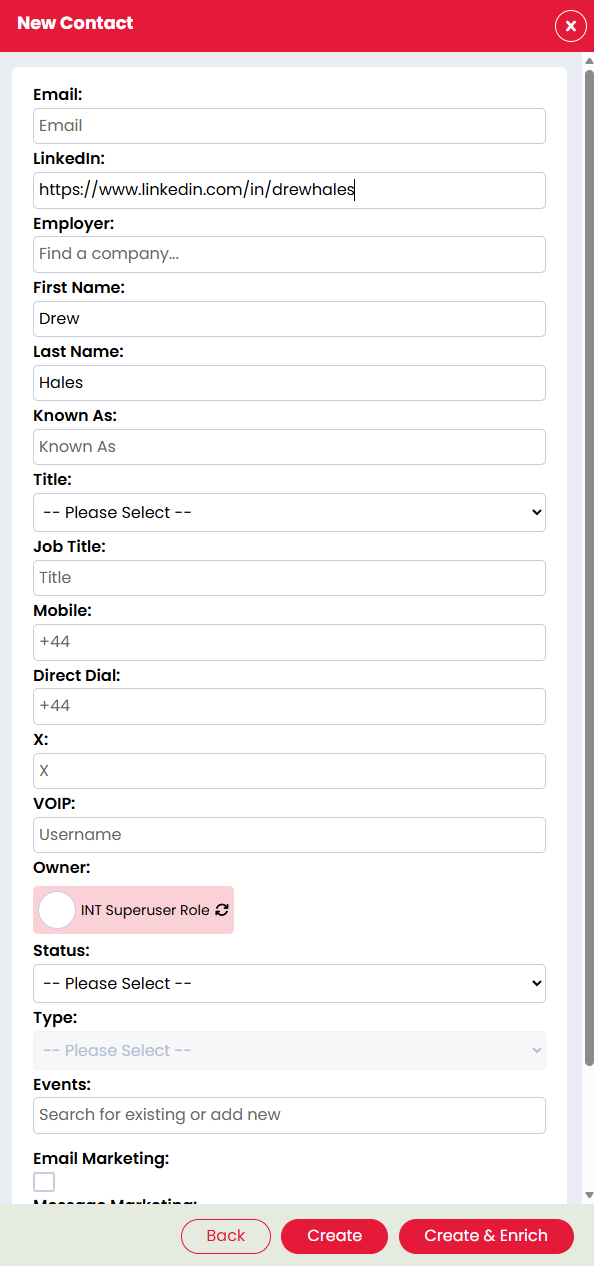
The contact will show an Enriching status while Firefish Enrich searches for results. When complete, the status updates to Enriched and any verified or validated data found will populate the relevant fields.
Enrich an existing contact
-
Open the contact record.
-
Open the contact task menu.
-
Select Enrich.
Bulk enrich contacts
Bulk enrich from Contact Search
-
Run your contact search.
-
Select the contacts you want to enrich.
-
Click Enrich.
Notes:
-
Each contact is enriched individually and will show its own Enriching and Enriched status.
-
Enrichment speed depends on how many contacts you submit.
-
You can enrich up to 450 contacts at a time, subject to available credits.
Enrich contacts from a Company record
-
Open the company record.
-
Open the company task menu.
-
Select Enrich Contacts.
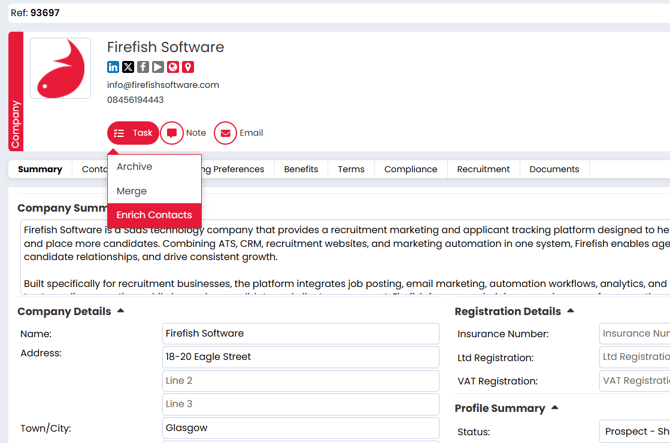
Each contact will enrich individually and update as results are returned.
Understand the confidence fish icons
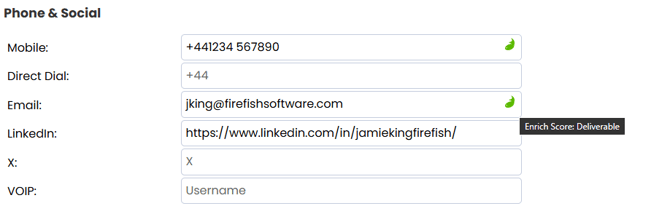
Email confidence fish
-
Green: Deliverable
-
Blue: High Probability
-
Orange: Catch-All
-
Red: Invalid or not found
Phone confidence fish (Mobile and Direct Dial)
-
Green: Verified
-
Orange: Valid but unverified (no match found)
-
Red: Invalid number or no match found
What Firefish Enrich overwrites (and what it won’t)
-
Firefish Enrich overwrites existing data only if it finds a more confident verified match.
-
Firefish Enrich does not change existing data if the best result returned is less confident than what is already stored.
Where to see what happened
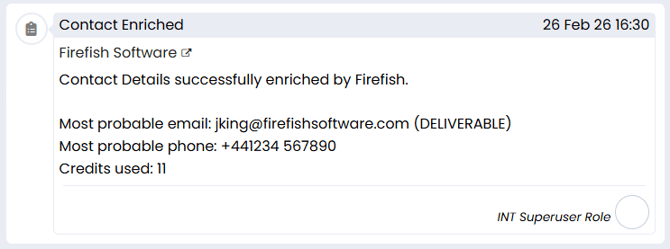
When enrichment completes, Firefish logs an action in the contact’s activity feed:
-
Action label: Contact Enriched
-
Includes what was found and what was charged
Need to manage packages or purchase more credits?
Super Users can manage Firefish Enrich subscriptions, credit packages and billing from Account & Billing. See Enabling Firefish Enrich and Managing Credits for full instructions.
Troubleshooting
Enrichment finished but nothing changed
If Firefish Enrich does not find a more confident result than what is already stored, your existing data will remain unchanged.
Email updated but no phone numbers were added
Firefish Enrich may find a deliverable or high probability email but not find a verified phone number. Check the phone confidence fish icons for Mobile and Direct Dial.
I can’t run Firefish Enrich
If Enrich is missing or greyed out, you may not have the correct permissions. Speak to a superuser or administrator.
FAQs
Why wasn't my contact enriched?
-
Firefish Enrich can only enrich contacts where sufficient information is available to identify a match. If no suitable match is found, the contact record will remain unchanged. For best results, ensure your contact contains accurate information such as their name, company and email address.
Can I enrich the same contact more than once?
-
Yes. You can run Firefish Enrich on the same contact again if their information may have changed or if additional data has become available since the last enrichment.
Can I undo an enrichment?
-
No. Once an enrichment has completed, the changes can't be automatically undone. If required, you can manually edit the contact record to restore previous information.
- Enrichment is a background process that typically, takes around 1 minute per contact to complete. However, this will vary according to the number contacts in a bulk enrichment, and also the number of sources needed to check before any successful matches are found.
-
Is Firefish Enrich compliant with GDPR & UK Data Protection?
-
Firefish Enrich is designed to support use in line with GDPR and UK data protection requirements. Enrichment is carried out for business contact data only, using Firefish’s enrichment data partner under a Data Processing Agreement. This agreement confirms that data is processed only for the enrichment purpose, on documented instructions, with appropriate security measures, support for data subject requests, breach notification obligations, and safeguards for international transfers where required.
As with any use of personal data, your business remains responsible for ensuring you have an appropriate lawful basis for processing and for meeting your own transparency obligations.
-
-
How does Firefish Enrich retain and use my data?
-
Firefish Enrich uses your submitted contact data only to complete the enrichment request. The enrichment process is designed as a real-time lookup rather than a two-way sync or shared database. Your input data is not used by Firefish or our providers to build, resell, or aggregate a separate database.
Enriched data processed by our providers is stored for up to 3 months, then automatically deleted. Cold backups may remain for up to 6 months before being securely wiped. Any third-party providers involved in the lookup are contractually restricted from retaining, reusing, reselling, or repurposing your data beyond fulfilling the enrichment request.
-