.png?height=120&name=Firefish_Icon_2019_RGB_72dpi%20(2).png)
Connect VoxFlo to Firefish for AI call logging
Integrating VoxFlo with Firefish allows you to automatically log and transcribe phone calls against your Contact, Candidate, and Client records. In this guide, you'll learn how to enable the integration in your Firefish account, share your credentials with VoxFlo, and understand how inbound and outbound calls are processed.
Quick Jump to:
Sharing your details with VoxFlo
Matching calls to the correct record
Benefits of using the VoxFlo Integration
VoxFlo connects your phone system with Firefish so every call is captured and logged against the right record, complete with AI summaries, full transcriptions and sentiment.
Before you start, you’ll need:
- A VoxFlo account and onboarding arranged with their team
- Your phone system (for example, 8x8 or Zoom) is installed and ready to connect
Enable VoxFlo in Firefish
- Log in to Firefish with a user who has access to system settings.
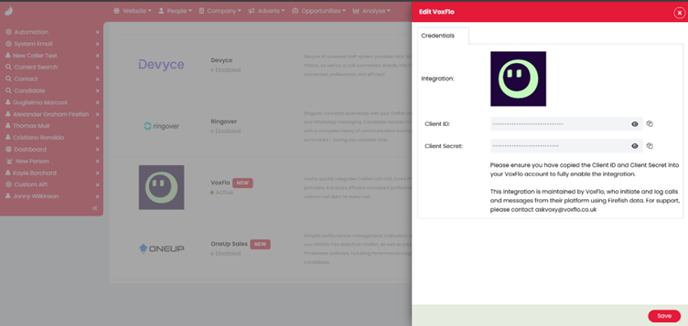
- Go to Settings > Integrations.
- Under the Automation section, find VoxFlo.
- Select Enable.
- Copy the ID and Secret displayed on screen
Share your details with VoxFlo
- Send your Firefish ID and Secret to your VoxFlo contact.
- The VoxFlo team will connect your Firefish site to their platform and link it with your phone system as part of your onboarding.
Once VoxFlo confirm the integration is connected, you’re ready to start making and receiving calls via Firefish.
How the integration works
Once enabled, VoxFlo sits between your phone system and Firefish to automatically log and enrich your calls.
Outbound calls from Firefish
- Open a Contact or Candidate record in Firefish.
- Click call & message to make a call, then click on the number
- A VoxFlo pop-up will appear and place the call.
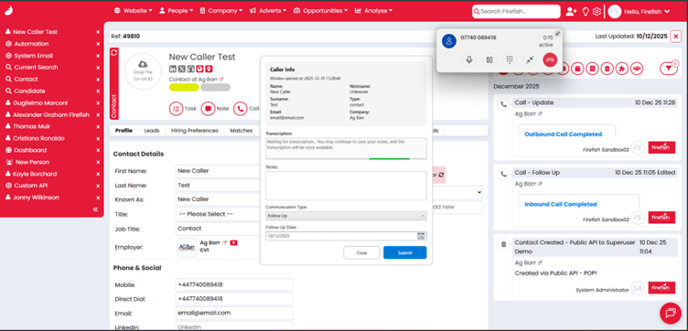
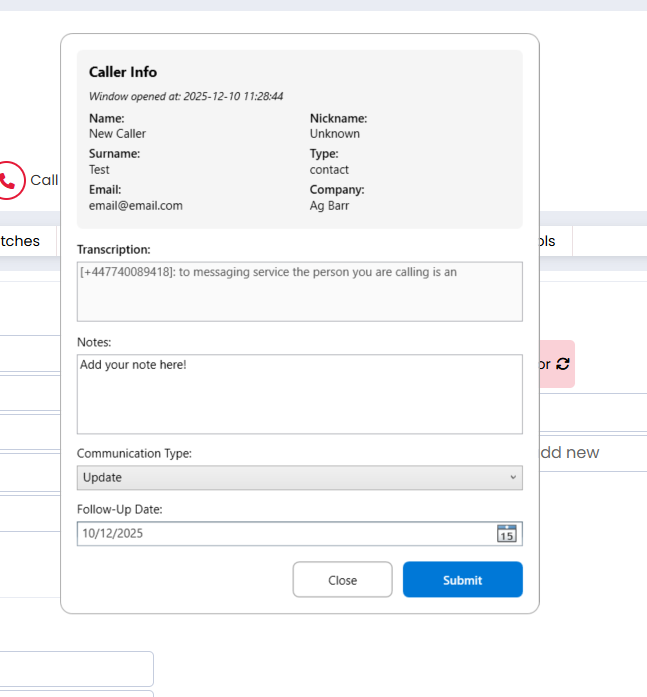
At the end of the call, the VoxFlo pop-up prompts you to log the details:
- Add your note about the call
- Choose a communication type (comms type)
- Set a follow-up date if needed
- Click Submit to save the call
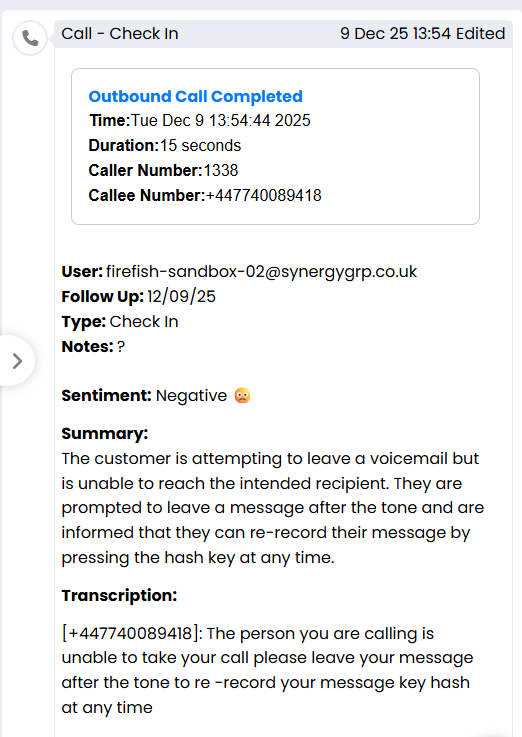
Firefish will then create a comms note on the record with:
- Call details
- An AI-generated summary
- The sentiment of the call (for example: positive, neutral, negative)
- The full transcription of the conversation
Inbound calls
When someone calls your number:
- You’ll see an incoming call pop-up and VoxFlo will navigate to the relevant record inside Firefish
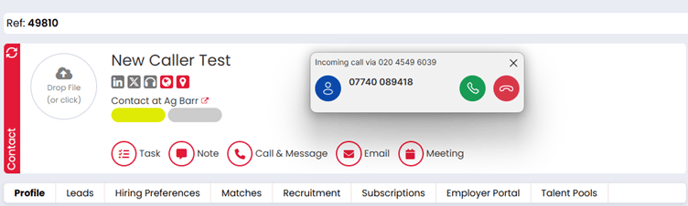
- Answer the call
- VoxFlo opens its pop-up window following the call for you to log the call.
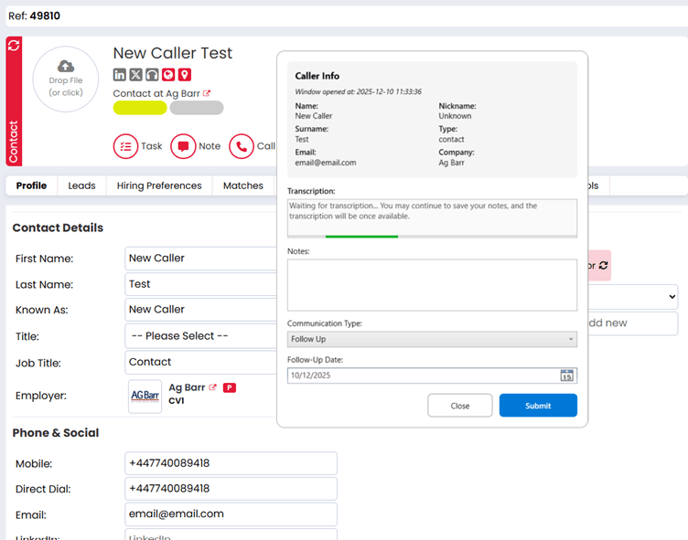
You then:
- Add your note
- Select the comms type
- Add a follow-up date if required
- Submit the call
A note is created in Firefish on the relevant record, again including sentiment, summary and transcription.
Matching calls to records
VoxFlo helps make sure every call is attached to the right contact or candidate in Firefish.
If the number matches a single record
- VoxFlo automatically logs the call against that contact or candidate once you submit your notes.
If the number is on multiple records
- When VoxFlo pops up, you’ll see a list of matching records.
- Select the contact or candidate you want to log the call against and click Open Selected.

- Complete and submit your call details as normal.
The number doesn’t exist in Firefish
If you make or receive a call from a number that isn’t stored in Firefish:
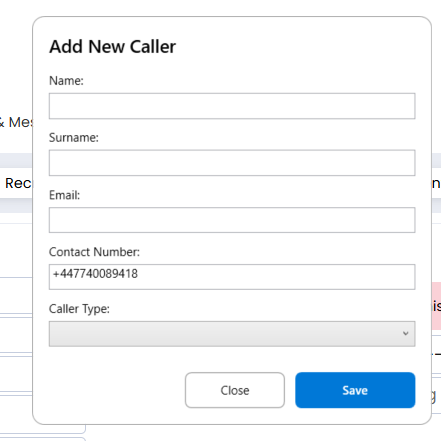
- VoxFlo will prompt you to add a new caller.
- Enter the caller’s name.
- Choose whether they should be created as a Contact or a Candidate.
- If you select Contact, search for and select the Company they belong to.
- Save your changes.
This creates a new record in Firefish with the phone number attached and logs the call against it.
Benefits of using the Voxflo Integration
Using VoxFlo with Firefish gives you:
- Consistent call logging
Every inbound and outbound call is captured and stored against the correct contact or candidate. - Richer call history
Each note includes the sentiment, summary, and full transcription, allowing your team to quickly review what was discussed without needing to listen to the calls. - Less manual admin
Log notes, comms type and follow-up dates in a single pop-up as soon as the call ends. - Cleaner data
Prompts you to choose between duplicate records when numbers are shared, and to create new records when unknown numbers come in. - Better collaboration and business insight
Everyone can view detailed call information directly in Firefish, helping consultants follow up effectively and managers get a clearer picture of pipeline activity and call quality.