![Firefish_Icon_2019_RGB_72dpi (2).png]](https://fishtank.firefishsoftware.com/hs-fs/hubfs/Firefish_Icon_2019_RGB_72dpi%20(2).png?height=40&name=Firefish_Icon_2019_RGB_72dpi%20(2).png)
Why wait for support to action this for you? As a Super User, you have the ability to change a user's license type.
Quick Guide
-
Navigate to User Management
Go to Settings > User Management > Users to access a list of active users.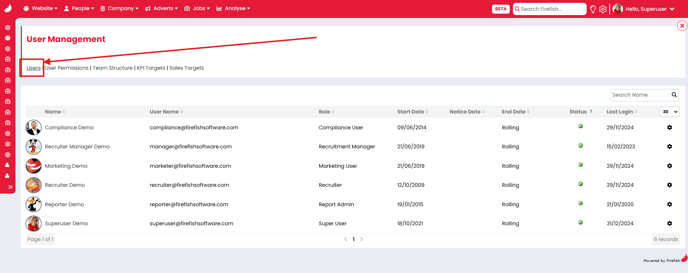
-
Select the User
Identify the user whose role you wish to change. Under the Actions column, click the cog icon and select Change Role.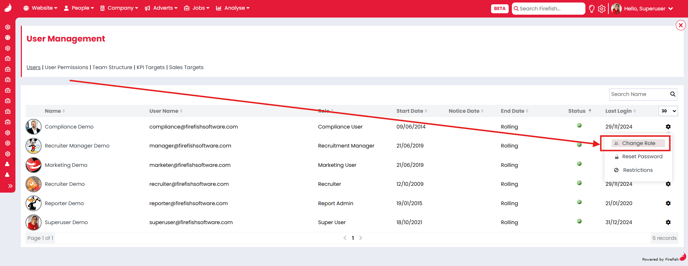
-
Update the Role
A pop-up window will appear. Choose the desired role for the user and click Save.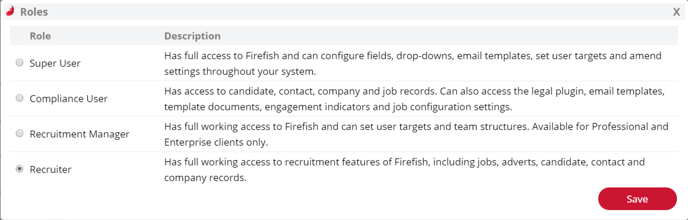
Special Cases
If you need to change a user’s license type to Marketing Admin or Report Admin, please reach out to Support for assistance.
This streamlined process ensures that managing user roles is both efficient and flexible.