![Firefish_Icon_2019_RGB_72dpi (2).png]](https://fishtank.firefishsoftware.com/hs-fs/hubfs/Firefish_Icon_2019_RGB_72dpi%20(2).png?height=40&name=Firefish_Icon_2019_RGB_72dpi%20(2).png)
Create a signature that reflects your brand or personal style. You can build one from scratch, use the company default, or paste in a signature you’ve already created elsewhere.
Contents:
- Create a Company Signature
- Copy Company Signature
- Copy From Another Program
- Edit Your Signature
- Saving Your Signature
Create a Company Signature
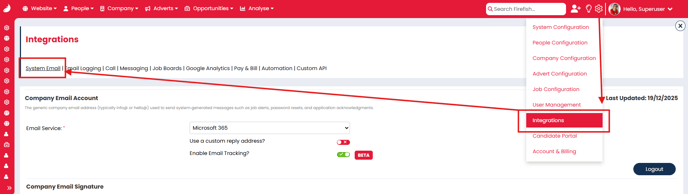
You can manage your company’s email signature by navigating to Settings > Integrations > System Email.
Copy Company Signature
To use the company signature as your own, go to your Email Settings (via your name > My Integrations > Email Settings), click Copy Company Signature, and confirm the prompt to replace any existing content.

ℹ️ Note: The Copy Company Signature button will only be visible if a company email signature has been created
Copy From Another Program
If you’ve already created your email signature in another program, copy it and paste it into the Firefish signature box. Use Ctrl+V on Windows or Cmd+V on Mac. Both text and images will be copied.
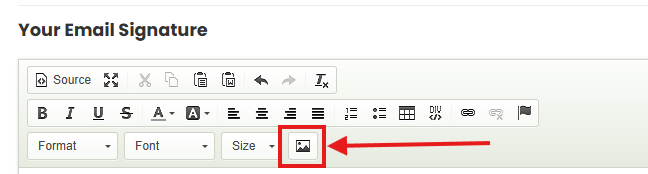
⚠️ Note: Images pasted from external programs may not display correctly when sent, select each image and click Image Properties, then Browse Server, and choose a version that has been uploaded.
Edit Your Signature
To update your signature, simply type into the text box as you would in Word or Outlook.
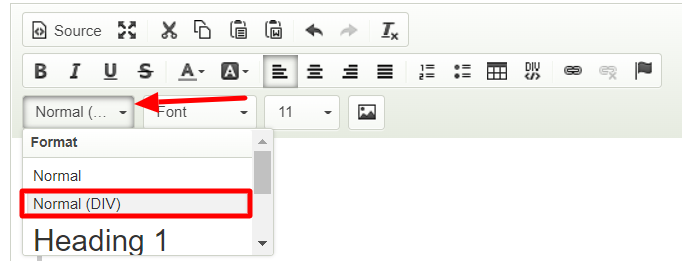
To adjust line spacing, highlight the text and select Normal (DIV) from the Format dropdown.
Saving Your Signature
Once you’re happy with how your signature looks, choose the relevant email address and click Test & Save. You’ll receive a test email to confirm it looks right. Changes won’t be applied until this step is completed.

Top Tips
Here are some common tips provided from the help desk.
- If you’re using an image, resize it before uploading it to Firefish. Outlook may still load the original image size if it’s only resized inside Firefish.
- If you change your email password, make sure you update it in Firefish. Otherwise, your emails won’t send.
- Want to sync emails from Outlook or another client? Install one of our Add-Ins.