![Firefish_Icon_2019_RGB_72dpi (2).png]](https://fishtank.firefishsoftware.com/hs-fs/hubfs/Firefish_Icon_2019_RGB_72dpi%20(2).png?height=40&name=Firefish_Icon_2019_RGB_72dpi%20(2).png)
This article explains how to integrate Firefish with Timesheet Portal (TSP), allowing contract placements in Firefish to sync automatically with your timesheet platform.
Jump to:
- What is Timesheet Portal?
- How Timesheet Portal works in Firefish
- How to Set Up Timesheet Portal in Firefish
- Field Property Settings
- How to Search for Placements in Firefish
- What Information is Shared with Timesheet Portal?
What is Timesheet Portal?
Timesheet Portal (TSP) is an online timesheet and contractor management platform. It enables contractors to submit timesheets digitally and allows agencies to manage placements, billing, and approval workflows efficiently.
How Timesheet Portal works in Firefish
When integrated, Firefish sends all new and updated contract placements to Timesheet Portal automatically. This includes contract details, candidate, job and company information. The sync runs in near real-time (every 15 minutes) to ensure your placements are always up to date.
This integration is one-way: Firefish pushes data to TSP, but TSP does not send data back to Firefish.
How to Set Up the Timesheet Portal Integration
Setting up Timesheet Portal in Firefish is straightforward. Follow these steps:
- Create Your Timesheet Portal Account: Ensure you have an active account with Timesheet Portal and notify their team that you’ll be integrating with Firefish. This allows them to set up CRM integration for you.
- Enable Integration in Firefish:
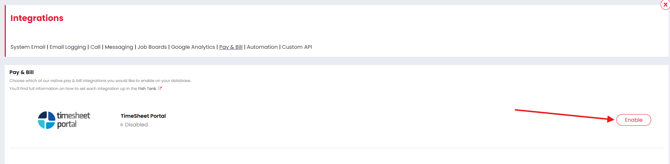
- Go to Settings > Integrations > Pay & Bill.
- Enable Timesheet Portal.
- Enter Credentials in Timesheet Portal:
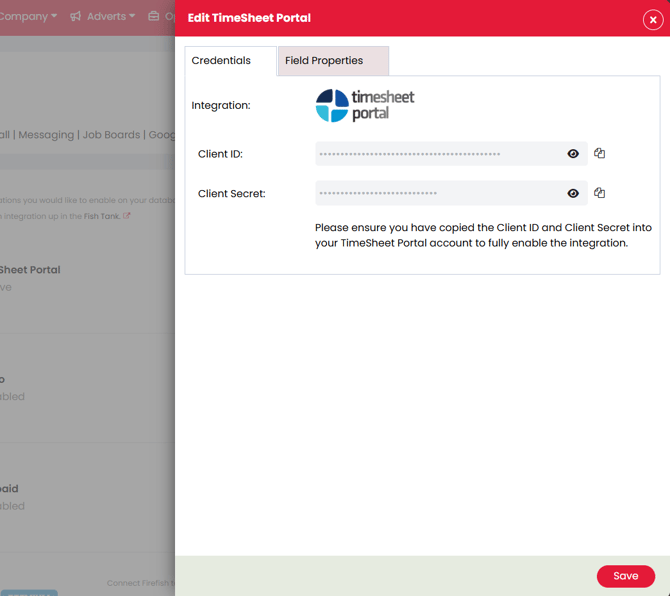
- Copy the Client ID and Client Secret provided in Firefish.
- Paste these credentials into the integration settings within Timesheet Portal.
Field Property Settings
Within your Firefish workflow, you can now configure field properties specifically for Timesheet Portal integrations. These settings allow greater flexibility and ensure critical data is completed before sync:
- Custom Fields: You can create custom fields related to placements that are specific to Timesheet Portal use.
- Mandatory Fields: Any system or custom field can be set as mandatory before a placement syncs with TSP.
- Workflow Configuration: Go to Settings > Placements > Timesheet Portal Field Properties to adjust visibility and mandatory settings.
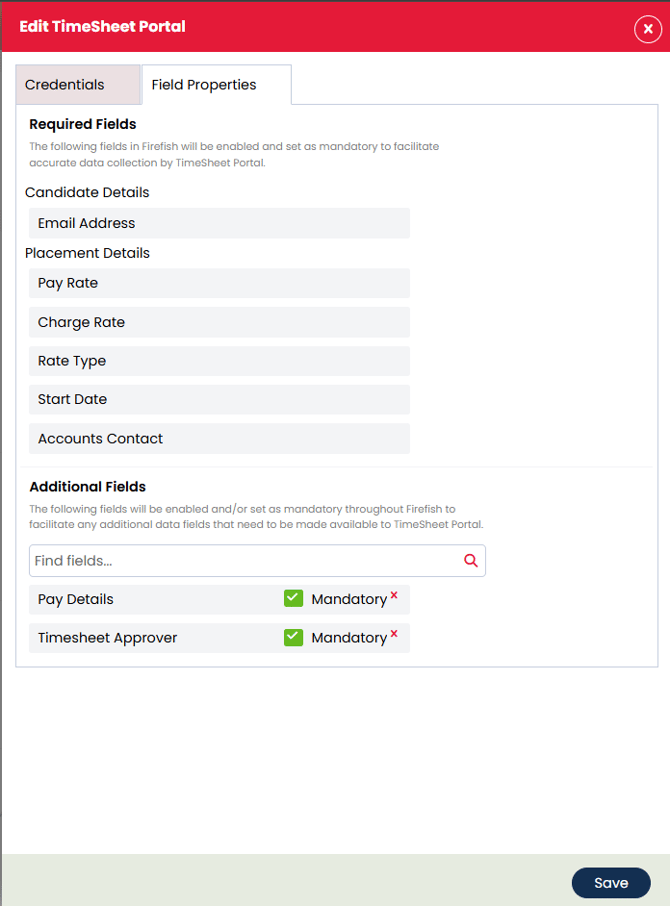
This ensures all required data is entered by your consultants before a placement is shared with Timesheet Portal.
How to Search for Placements in Firefish
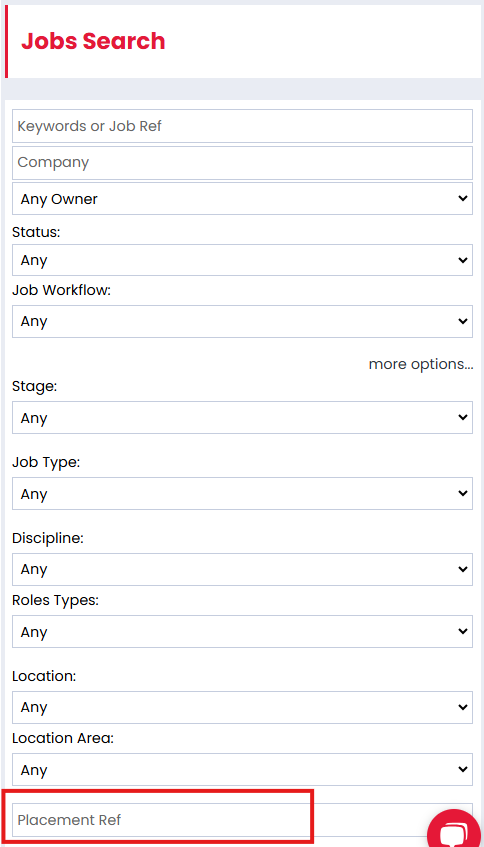
- Navigate to Placements > Contract Placements.
- Use filters to search for placements based on client, candidate, date, or sync status.
- Check the TSP Sync Status column to see whether the placement has been sent successfully.
What Information is Shared with Timesheet Portal?
The following data is shared from Firefish to TSP:
- Candidate name and contact details
- Job title and reference
- Company name and address
- Contract start and end dates
- Pay and charge rates
- Timesheet frequency and working pattern
API Endpoints Used:
- Candidate Details: Retrieved via the Candidate API endpoint.
- Company Details: Retrieved via the Companies API endpoint.
- Placement Details: Pulled through the Placement Details API endpoint.