![Firefish_Icon_2019_RGB_72dpi (2).png]](https://fishtank.firefishsoftware.com/hs-fs/hubfs/Firefish_Icon_2019_RGB_72dpi%20(2).png?height=40&name=Firefish_Icon_2019_RGB_72dpi%20(2).png)
Use the links below to jump to each section:
How to Suggest a Candidate
The Suggest tool lets you highlight a strong candidate by recommending them to a colleague in your team. You can quickly share the profile, add context with a star rating, and notify your colleague in Firefish.
Step 1: Review the Candidate
-
Open the candidate record you want to suggest.
-
Review their CV, notes, and activity to ensure they’re suitable for the colleague you have in mind.
Step 2: Click Suggest
-
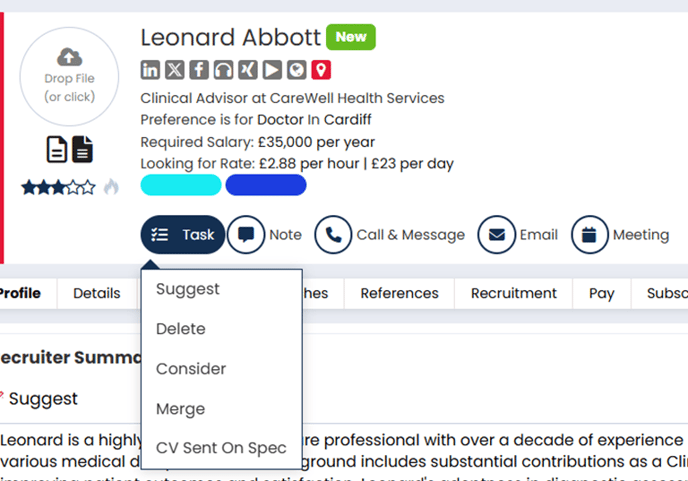
Select Task.
-
Click Suggest from the dropdown.
Step 3: Choose a Colleague and Rate the Candidate
-
Select the colleague you want to suggest the candidate to.
-
Give the candidate a star rating out of five.
-
Add an optional note explaining why you’re recommending them.
-
Click Confirm Suggestion.
What Happens Next
-
Your colleague will receive a notification in Firefish and a To Do item to review the suggested candidate.
-
The candidate record will show a history entry for transparency.
Troubleshooting Tips
-
Can't see the Suggest button? Make sure you're viewing a candidate profile, and that your user role has permission to suggest.
-
Wrong person suggested? You can't edit a suggestion, but you can leave a note or make a new suggestion if needed.
This feature supports collaboration between consultants by helping you share great candidates without sending emails or creating manual tasks.