.png?height=120&name=Firefish_Icon_2019_RGB_72dpi%20(2).png)
Here's what we released in week 4 of November
CRM
New Contract Workflow Custom Text Fields
Version(s): Basic/Professional/Enterprise
We’ve added 10 new Custom Text Fields (11–20) to System Configuration > Properties > Contract Workflow.
These new fields match the behaviour of the existing ones. Users can:
-
Enable them for Job Summary and Job Offer, with optional mandatory settings.
-
Use them as email merge fields across all job, offer, placement, extension, and termination templates.
-
Add them as columns in the Reports Dashboard (Job Summary dataset).
-
Access them through the Get Custom Job Fields API endpoint.
This gives clients more flexibility when capturing custom job information.
Find out More
Integrations
Public API – Adding Job Code Job Endpoint
Version(s): Basic/Professional/Enterprise
The Job API now includes the Job Code field when retrieving a specific temp job.
Find out More
Timesheet Portal Field Properties Tab
Version(s): Basic/Professional/Enterprise
We have introduced a new “Field Properties” tab to Timesheet Portal, giving you the complete list of all required fields that Timesheet Portal require for each contract placement.
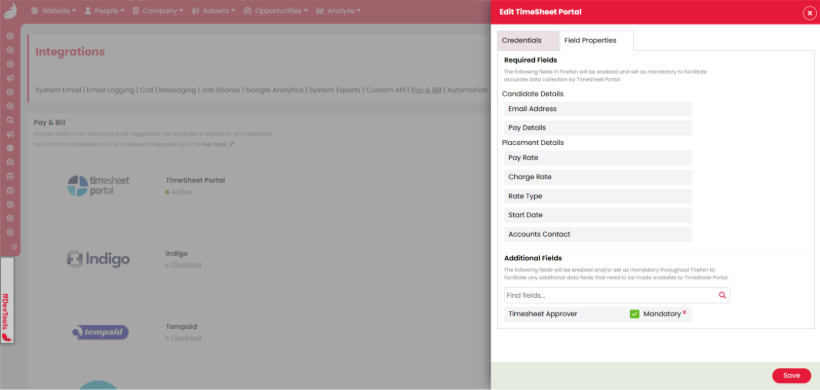
The tab also includes an “Additional Fields” section, where you can select from a list of fields that you want to be enforced to appear, but also make the fields mandatory. The “Timesheet Approver” field will be defaulted to selected and mandatory from the additional fields list, but this can be amended or removed.
All additional fields that are enforced to appear or mandatory will have its corresponding toggle locked within the Firefish settings, with a tooltip advising it is required for Timesheet Portal.
Fish Tank Article(s)