Highlights
Here are the key highlights from the January Product Releases:
- 📧 Email template improvements – Action-based merge fields (e.g. password reset links, GDPR review buttons, unsubscribe links) are now grouped into a new "Actions" dropdown, making merge fields easier to find and distinguish from standard information fields. There is no change to functionality, only the way they're organised.
- 🗂 Better template organisation – The new Actions dropdown only appears on email templates that actually contain action-based merge fields, keeping other templates uncluttered.
- 🔗 Timesheet Portal API enhancement – All new and existing Timesheet Portal API profiles now automatically include the
candidatesAPI-readpermission. - 👤 Expanded Timesheet Portal integration – The new API scope allows Timesheet Portal users to search candidates and retrieve candidate record information, improving integration capabilities.
CRM
Email Templates – Actions merge fields grouped into a new dropdown
Version(s): Basic/Professional/Enterprise
When editing Email Templates, some merge fields that perform an action (for example, sending the forgotten password URL) have been moved into a new Actions dropdown.
This change helps keep merge fields organised and makes it easier to distinguish between:
- Merge fields that display information, and
- Merge fields that prompt the recipient to take an action
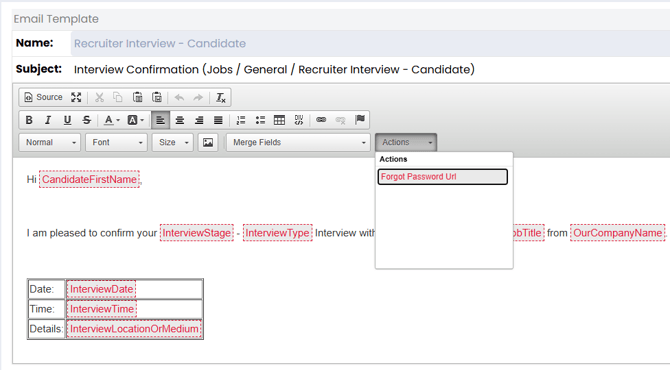
The Actions dropdown will only appear on templates that contain action-based merge fields. Templates without these fields are unchanged.
There is no change to how these merge fields work, only where they are selected from when editing templates.
The affected email templates are:
- Candidate > Action > Legal Plugin - Candidate GDPR Opt-in – Reminder
- Review Now Button
- Review Now Link
- Adverts > Direct Application Acknowledgement - Comms Preferences
- CommPreferencesLink
- Opportunities > General > Employer Interview - Candidate
- ForgotPasswordUrl
- Opportunities > General > Recruiter Interview - Candidate
- ForgotPasswordUrl
- Opportunities > General > Email - Candidate
- UnsubscribeLink
- Employer Portal > Workflow - Employer Interview - Candidate
- ForgotPasswordUrl
- System > Advert Renewal Reminder
- RenewalUrl
Fish Tank Article(s)
Tabbing Through Date Fields
Version(s): Basic/Professional/Enterprise
Users can now tab past date fields on the candidate record. Previously, when moving quickly through fields using the keyboard, the cursor would stop on date fields and interrupt data entry. This change makes keyboard navigation smoother and faster.
Job Workflows
Temp Workflow Change Requests
Version(s): Basic/Professional/Enterprise We have a couple of improvements to the Temp Workflow from client feedback; we’ve added a Leavers setting and changed how shifts from other jobs show in the List View.
Leavers Setting
A new setting has been added to give users control over how long candidates remain visible in the Availability Pool after being marked a leaver. 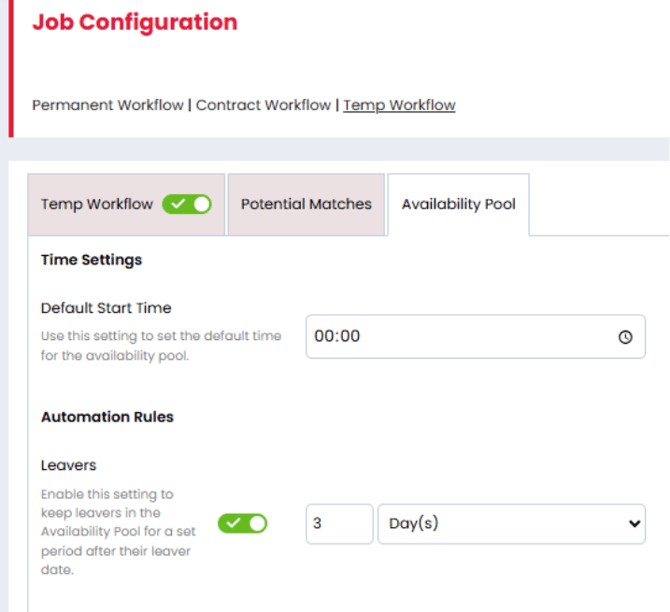
Within Settings > Job Configuration > Temp Workflow > Availability Pool, users can now choose whether leavers are removed immediately on reaching their end date or kept greyed out at the bottom of the pool for a configurable period. This behaviour also respects the End Worked Date setting, ensuring candidates are removed either on or after their end date as expected.
Shifts from other Jobs
When viewing a Temp job in List View, users may see shifts that a candidate is already booked onto in other jobs, helping prevent double-booking. These shifts are now shown in grey (instead of green) to make it clear they belong to a different job. The colour around the candidate profile is unchanged and continues to indicate whether the candidate is confirmed on the shift.
Integrations
Timesheet Portal – Adding candidatesAPI-read scope to Timesheet Portal API profiles
Version(s): Basic/Professional/Enterprise
New and existing Timesheet Portal API profiles have been upgraded to include the candidatesAPI-read scope. This change gives the users the ability to search for candidates and return candidate record information.
Fish Tank Article(s)
New Formatted CV Merge Fields – Job Title and Certifications
Version(s): Basic/Professional/Enterprise We’ve added a couple of new merge fields that can be used when creating Formatted CV templates, giving users more flexibility over the information included in generated CVs. Users can now insert:
- Job Title - pulls through the candidate’s job title when the formatted CV is created.
- Certifications - rolls up a candidate’s certifications into a single section, including certification name, awarded date, expiry date, and notes. Multiple certifications are shown as separate entries, and any missing details are automatically omitted for a clean layout.
As with existing merge fields:
- These fields can be added via Insert Merge Field when editing a Formatted CV template.
- They are populated when you use Create Formatted CV from a candidate’s original CV.
- If no data exists on the candidate record, the field will be left blank
Fish Tank Article(s)
Quil Rebranded to CoRecruit
Version(s): Basic/Professional/Enterprise Quil have rebranded to CoRecruit, as a result the integration has been updated to reflect this rebranding with the logo, name, and description changing. All existing Quil credentials will remain active until the integration is disabled. Fish Tank Article(s)
Talenta Integration
Version(s): Basic/Professional/Enterprise The Talenta integration has been added to the “Automation” settings page. The integration will generate a Client ID and Secret for our customers to connect Firefish to their Talenta profile.
Web
Compliance Updated Date
Version(s): Basic/Professional/Enterprise
We have now added a Compliance Updated date to the Details Tab on a Candidate Record, allowing users to view and report on the last updated date for all a Candidates’ Compliance Details. We have also added a new Date Search field for Compliance Updated Date within the Profile section of the Advanced Search Filters on a Candidate Search. Fish Tank Article(s)
- https://fishtank.firefishsoftware.com/the-candidate-details-tab
- https://fishtank.firefishsoftware.com/how-to-find-candidates
Candidate Tags Search Field
Version(s): Basic/Professional/Enterprise
Following on from the recent addition of Candidate Tags to the Candidate Profile, we have introduced the ability to search specifically on these tags. Users will be able to search for Tags and/or candidate Skills separately and add the Tags column to Candidate Search results via the Additional Filters menu.