- Why are there duplicates in my sales/placement report?
- What is the difference between Channel and Source?
- Sales figures troubleshooting
Why does my placement/sales report have duplicates?
If your report appears to show duplicate rows, it’s often due to not having added the appropriate data columns or filters to the report.
Check Your Columns First
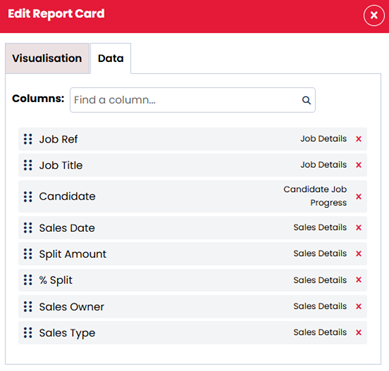
If you can’t see all the data, then rows might appear to be duplicated when they are not. To confirm if rows are true duplicates or if relevant information is missing, include the following columns:
- Candidate
- Sales Type
- Split Amount
- % Split
- Sales Owner
- Sales Date
These will help you identify what varies between each row. The most common assumed duplicates are actually multiple placements on the job (adding Candidate verifies this), there are terminations or extensions (adding Sales Type verifies this), or there are splits on the job (adding the split and sales info verifies this).
Make Sure You’re Filtering Correctly
Now that you have added the correct data columns, you might find that the sales type is showing extensions and terminations, but if the aim of your report is to see total placements, then you might wish to exclude these.
- Locate the report card
- Click the ‘…’ in the top right of the card
- Choose ‘Edit Details’
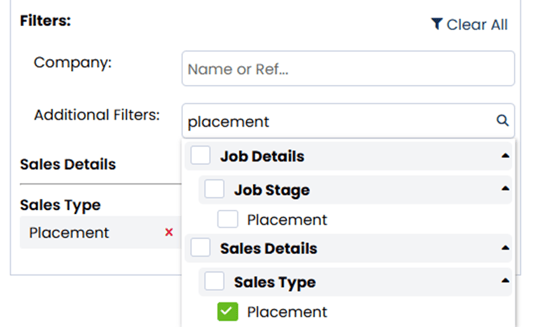
- On the Visualisation tab, click into the Filters field at the bottom and search ‘place’
- Select the ‘Placement’ option under Sales Type:
What is the difference between Channel and Source in my reports?
When building reports to see candidates created, application source, or a report to see which advertising avenues are the most valuable, you might notice that you can choose both/either Channel and Source.
Channels and Sources track how candidates enter your system - either by registering directly or applying to a job advert. This helps report on where candidates and applications are coming from, and if candidates return through the same method (e.g. certain job boards or if they engage with job alerts).
- Channel: Automatically assigned and not editable. It reflects the method the candidate used to enter the system, such as manual creation by one of your users, job board application, or self-registration on your site.
- Source: Manually selected by the user or candidate. It offers flexibility for tracking marketing spend—for example, using specific source labels for social media or non-integrated job boards.
Example: If a candidate sees your job on Facebook and applies via your site, the channel will be "Website", but they can select the source of "Facebook".