Sending CVs directly from a job allows you to progress candidates through your recruitment workflow and keep hiring managers informed with minimal effort.
This guide explains how to send candidate CVs via email using the Send CVs action in the Job Workflow tab.
How to Send CV's
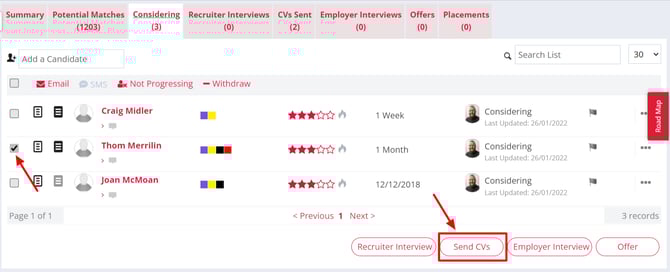
You can send candidate CVs to hiring managers through Firefish by using the Send CVs button shown at the bottom of either the Considering or Recruiter Interviews stages.
-
Start by ticking the box next to the candidates name
-
Then click the Send CV Button
Firefish will then generate an email to each candidate (to let them know you've submitted their CV) as well as an email to the hiring manager with the CVs attached. By default, a candidate's formatted CV will be attached to the email to the hiring manager.
What if the candidate has no Formatted CV?
If your Candidate has no Formatted CV attached to their record, no CV will be attached to the email to the contact. This would have to be present on the candidate record at the time of sending to attach.
You can also choose whether a candidates Cover Notes, Interviews Notes, job Terms and Candidate Screening documents are attached when sending a CV to the contact. Super Users can control these settings via Job Configuration.