A Talent Pool in Firefish is a tool used to group and organise candidates based on shared characteristics - such as skills, industry, availability, or engagement stage - so recruiters can easily manage and target these groups for specific opportunities. In this article we will review how to create a talent pool, and share some examples of some which will allow you to get the most out of your data.
- What Can I Do With My Talent Pools?
- How to Create a Talent Pool
- Recommended Talent Pool Criteria
- Can I Create a Blank Talent Pool?
- How Many Talent Pools Can I Have?
What Can I Do With My Talent Pools?
- Group together lists of candidates whom you may want to speak to regarding particular role types, or with a certain skill set, based in a certain location, etc.
- Email or send SMS to the candidates in a talent pool
- Consider the candidate's to a job in bulk
- Send a mailshot to the talent pool from an advert
How to Create a Talent Pool
To create a talent pool:
- Go to the People tab at the top of the screen.
- Select Talent Pools.
- Choose Add in the top right.
- Select your desired criteria (see the next section in this article for some suggestions), and make sure to give the talent pool a name.
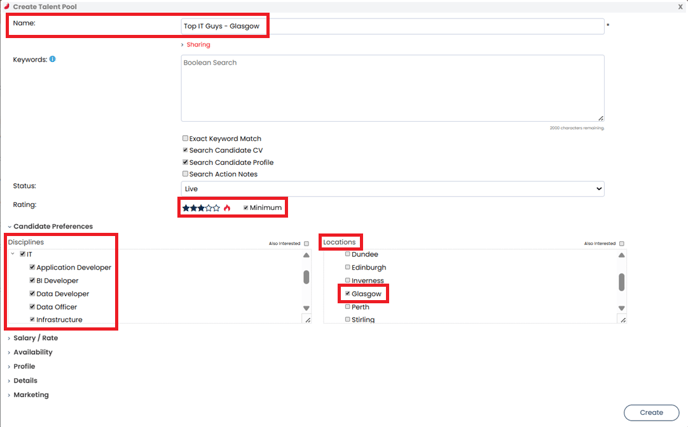
- When you're ready, select Create.
Recommended Talent Pool Criteria
1. Hot Flame / Star Rating
Create a talent pool looking for a particular star rating or for candidate's marked with a hot flame. This allows you to see the best candidates in your database at a glance.
2. Contractors/Temps Currently in Contract
Keeping a list of contractors or temps who are currently on assignment makes communication easier. You can send bulk emails or SMS updates, and also track candidates whose contracts are ending so you can proactively place them in new roles. Select Currently in Contract in the Availability section.
3. Certification/Skill/Language
If your roles require specific certifications, skills, or language abilities, a talent pool saves you time by eliminating the need to run new searches for each role. It also ensures you’re aware of newly added candidates who meet the criteria. Set the desired Certification, Skill or Language in the Profile section.
4. Update/CV Last Updated
A talent pool based on last engagement helps re-engage past candidates and maintain an up-to-date database. Identifying candidates who haven’t interacted with you recently can be a great way to refresh your talent pipeline. Set the data parameters in the Profile section.
5. Candidate Details
Building a talent pool based on candidate details ensures compliance information is always up to date. This helps you keep track of candidates who require specific compliance documentation to be eligible for work. Set the desired Compliance Details in the Details section.
6. Preferences
If you specialise in a specific discipline or industry, setting up a talent pool for that sector allows you to quickly find matching candidates. You can then directly match them to roles or proactively send them to clients, leading to faster placements. You can choose which Disciplines, Roles, Locations and Specialisation you want to track from the Preferences section.
Can I Create a Blank Talent Pool?
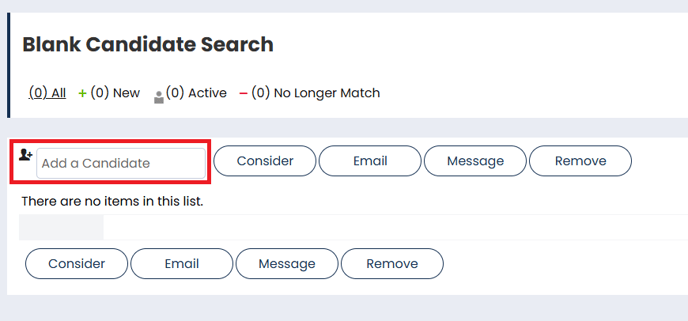
You may wish to create a blank talent pool so that you can manually add candidates whom are not otherwise linked.
If you want to create a blank talent pool, insert an unusual word or string of letters into the Keywords field, that nobody is likely to have on their record:
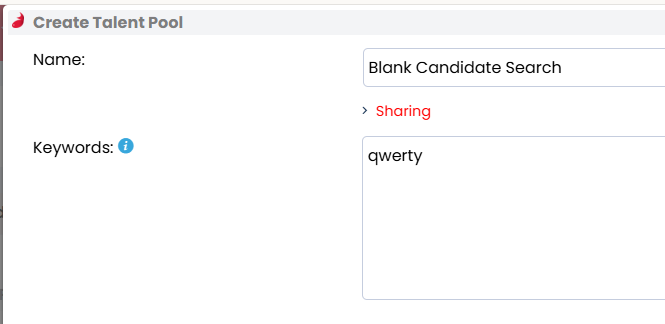
This will produce a blank list as the system won't be able to find any matches. You can then manually add candidates by searching for their name, reference ID or email address in the Add a Candidate field:
How Many Talent Pools Can I Have?
Each user can have a maximum of ten talent pools.