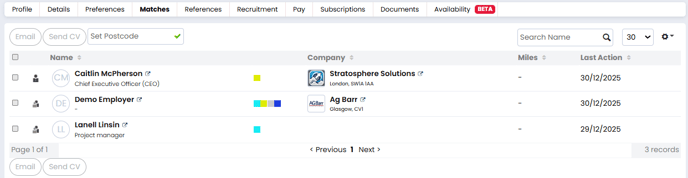
The Matches tab on a candidate record is used to view and manage all contact matches. It is a great tool which allows you to find suitable contacts to send the candidate's CV to as soon as their record has been created. This means that not a moment is wasted, and you have a chance to make the most out of the candidate before moving on to another task.
Matches Overview
The Matches tab will show you all of the contacts who the candidate would be a good fit for. This is based on the candidate's preferences matching the contact's hiring preferences.
The key preferences used for generating matches are:
- Discipline and role
- Location
- Specialisation
For example, if you have a contact who is consistently looking for Roofers in Glasgow, and you add a candidate with these preferences, you can immediately see this match and send out the candidate's CV within moments of creating their record.
You can see the name of the contact, their job title, the company they work for, and when the last action was with the contact.
Sending CVs from the Matches Tab
You can send the candidate's CV to one or multiple contacts in the list:
- Go to the Candidate’s record and click the Potential Matches tab.
- Select the Contacts you want to send the CV to.
- Click Send CV.

- The email modal will alert you if any Contacts are excluded due to Marketing Preferences or invalid email addresses.
- Make any changes you wish to the email body.
-
- If you wish, you can click the attached documents to view them before sending. If any need to be amended, just click the edit button at the top of the document.
-
- Click Send Email when you're ready.