The Subscriptions tab on a candidate record is used to manage all of the communication preferences and subscription settings for that candidate. This includes controlling whether they receive job alerts, use the Candidate Portal, and what marketing communications they can be sent. The Subscriptions tab makes it simple to see and update permissions in one place, helping you stay compliant and respectful of candidate preferences.
Subscriptions Overview
The Subscriptions tab shows you all of the candidate’s current subscription and permission settings. It gives you a quick view of what types of communication they have opted into or out of, and allows you to make changes easily without having to navigate away from the candidate’s record.
This includes:
-
Whether they have agreed to be contacted for marketing purposes.
-
If they have access to the Candidate Portal.
-
What types of job alerts they want to receive (and how often).
-
Stored consent information for GDPR compliance.
Marketing Permissions
Marketing Permissions control whether a candidate has agreed to receive email or SMS marketing communications from your team.
-
Go to the candidate’s record and click the Subscriptions tab.
-
Under Marketing Permissions, you will see whether the candidate is opted in or out.
-
To update their preference, simply toggle the option or select the appropriate checkbox.
-
Changes are saved automatically and will apply to future communications.
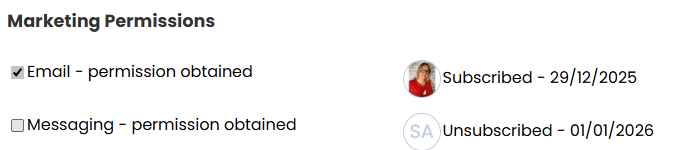
Ensuring candidates are only contacted according to their preferences helps maintain trust and keeps you compliant with data protection standards.
A marketing communication is anything that is sent from a candidate search or from the Reach tab on an advert.
Candidate Portal
The Candidate Portal section gives candidates access to a self‑service area where they can view and update their information, see their application progress, and manage their own alerts.
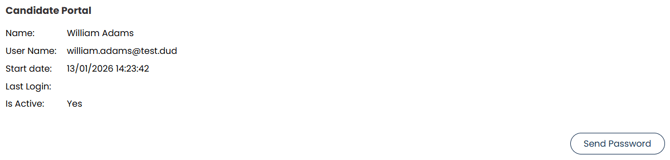
In the Subscriptions tab you can:
-
Enable Candidate Portal access.
-
See when the portal access was set up.
-
See when the candidate last logged in.
-
Resend portal access if needed.
If portal access is enabled, candidates will receive an email invitation to set up their portal login.
Job Alerts
Job alerts allow candidates to be notified about new adverts that match their preferences. Candidate's can have multiple job alerts set up.
There are two types of job alerts which you may see in this section:
-
My Preference - These are based on the preferences set up in the preferences tab.
- Custom - These do not need to match the candidate's preferences and can be set up by either the candidate themselves or a user
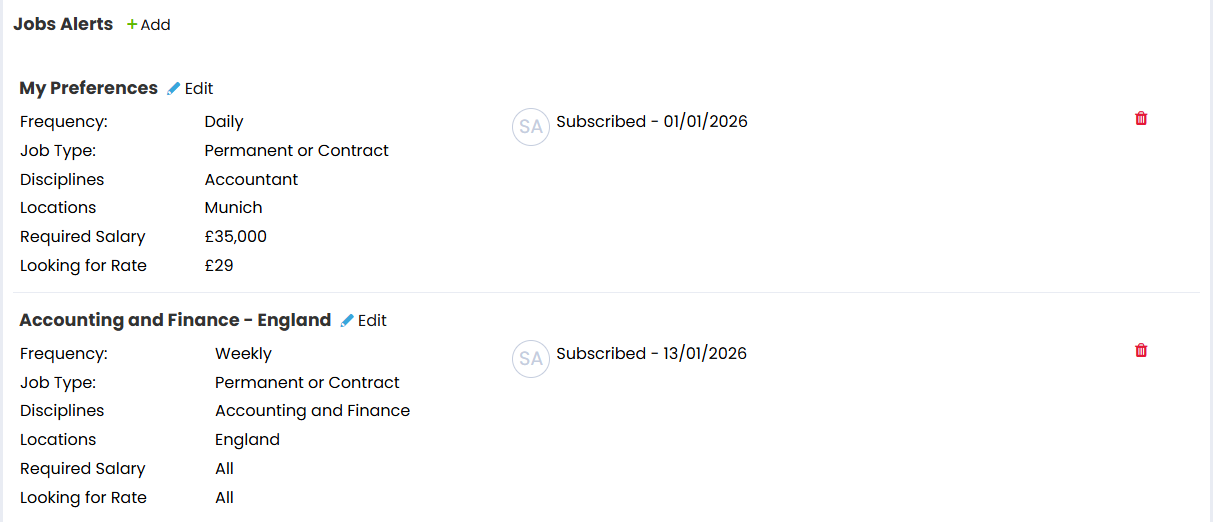
To adjust job alerts:
-
In the Subscriptions tab, locate the Job Alerts section.
-
Select Edit next to an existing job alert, or Add if you're creating a new one.
-
Set the desired requirements and frequency for the job alert.
- Save.
Job alerts help keep candidates engaged and improve the chances of matching them with suitable roles.
GDPR and Consent
The Subscriptions tab also helps you manage GDPR consent. For each communication type, the tab will display whether the candidate has provided consent, and the date that consent was captured.

You will be able to see the candidate's legal basis here, and issue your consent form if the candidate has either not yet agreed or if they are not marked as legitimate interest.
Here's a list of the different legal basis you can select and what they mean:
-
Consent Request: Creates the candidate and sends login details to direct them to login and accept the agreement with the option of an email being sent.
-
Consent Provided: Creates and agrees to the candidate agreement with the option of an email being sent. Can be used when you've received consent from a candidate. More information on this type of legal basis can be found on the ICO Website here.
-
Legitimate Interest: Creates and agrees to the candidate agreement with the option of an email being sent. This can be used when you use a candidates data in ways they would reasonably expect and which have a minimal privacy impact, or where there is clear justification for the processing of their data. More information on this type of legal basis can be found on the ICO website here.
-
Not Applicable At This Stage: This is available when adding candidates to the system. It will just create the candidate without opting them into any agreement.