This article outlines the most common issues encountered with the Timesheet Portal integration and how to resolve them. Use the links below to jump to specific troubleshooting areas.
- Exported Data Not Appearing in TSP
- API Integration vs Legacy Setup
- Merging Records
- Support Contacts and Further Reading
Exported Data Not Appearing in TSP
If data is missing from TSP, check the following configuration points:
-
Duplicate Job Custom Field names
If the Display Name of a Job Custom Field has been duplicated (Settings > System Configuration > Properties > Contract Workflow / Perm Workflow), this can cause export errors. Ensure all Display Names are unique.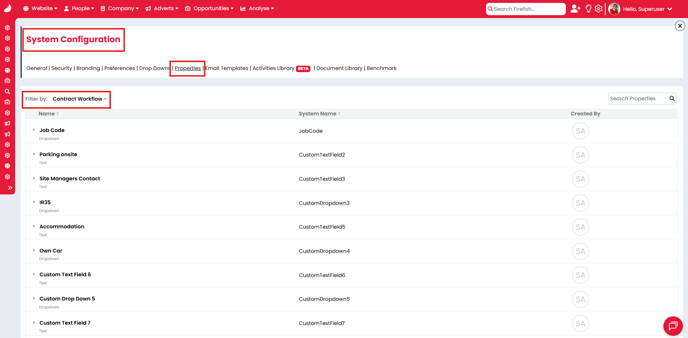
-
Duplicate email addresses
If the same email address exists on multiple candidate, contact, or timesheet approver records, this may prevent data from exporting. -
Incorrect field entry location
Custom Fields are only exported if completed on the Placement Summary. Fields completed only on the Job Summary will not be included in the export. -
Mandatory field configuration changes
If a placement is confirmed with empty optional fields, and those fields are later made mandatory, confirming an Extension may cause a blank mandatory field error. -
Field Properties not selected
Ensure the expected field properties are selected in Settings > Integrations > PAY & Bill > Timesheet Portal > Field Properties.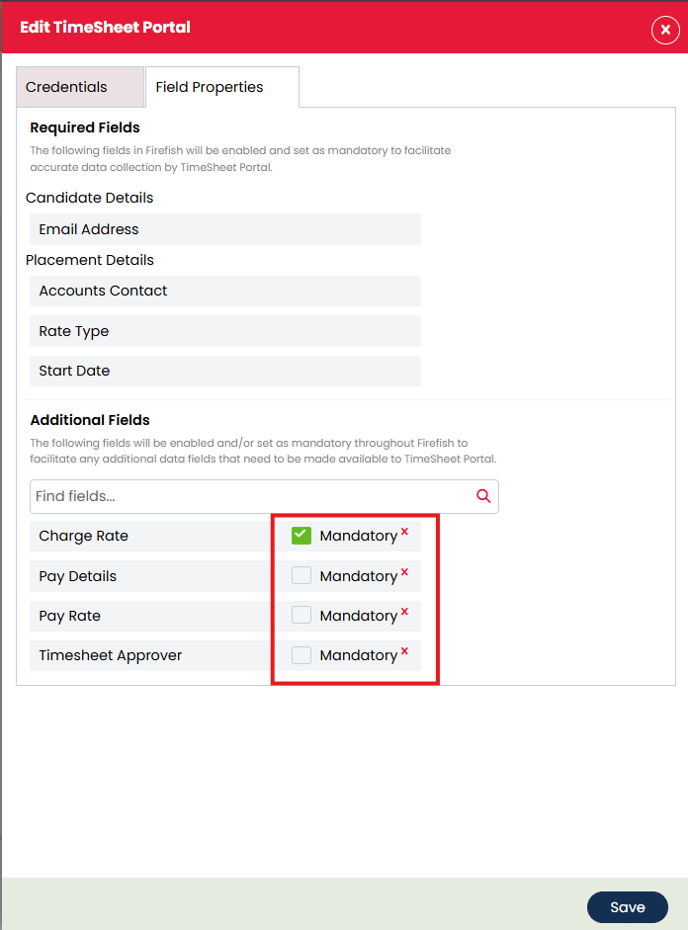
ℹ️ Please contact TSP Support for help with any of these issues
API Integration vs Legacy Setup
Timesheet Portal recently migrated to using the Firefish API. If your client is still using the legacy system exports, please contact TSP Support to discuss updating the integration.
Merging Records
When merging duplicate records in Firefish:
-
Ensure the primary Firefish record matches the Timesheet Portal code.
-
This alignment ensures the merge process completes without errors.
Further reading:
Support Contacts and Further Reading
-
Timesheet Portal Support: support@timesheetportal.com