The Pay tab on a candidate’s record stores the candidate’s payment and tax information.
If you are linking candidate pay details to umbrella or supplier records, this tab connects directly to the supplier details stored in the Supplier Directory.
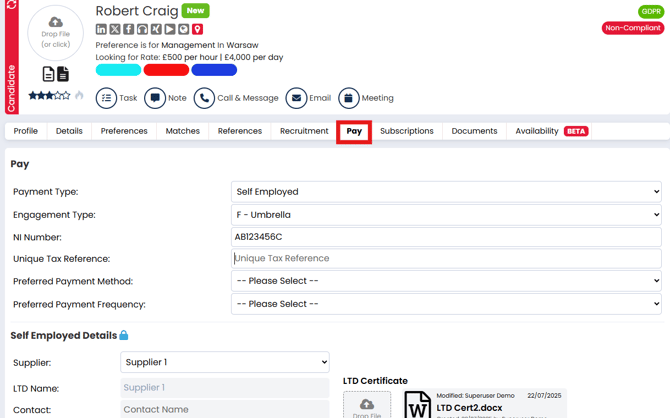
Please note: If you only have the Permanent Job Workflow enabled on your Firefish system the pay tab will not appear on the candidate record is this is exclusively used for the Contract & Temp Workflows.
What the Pay Tab Is For
The Pay tab allows you to:
-
Record a candidate’s payment type (PAYE or Self Employed)
-
Capture tax and payment preferences
-
Link self‑employed candidates to a supplier (e.g. umbrella company)
-
Upload supporting documents for compliance
-
Make this data available on offers and placements if compliance fields are enabled
Payment Details
Payment Type
Select how the candidate is paid:
-
PAYE – Pay As You Earn
-
Self Employed – Linked to a supplier (e.g. umbrella or LTD)
The selection here will determine which additional fields appear.
PAYE Fields
When PAYE is selected you can enter:
-
NI Number
-
Unique Tax Reference (UTR)
-
Preferred Payment Method – Choose from configured methods
-
Preferred Payment Frequency – Weekly, fortnightly, etc.
Self‑Employed Fields
When Self Employed is selected:
-
Engagement Type – Choose the applicable engagement type (e.g. F – Umbrella)
-
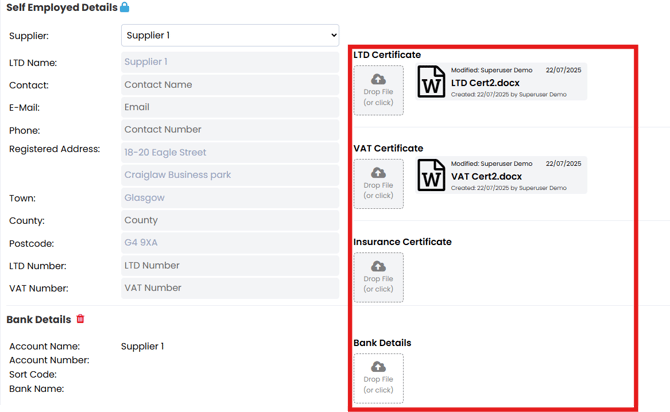
Supplier – Link to a supplier in your Supplier Directory
-
Once a supplier is selected, contact and registered business details are shown for reference
Document Uploads
You can upload relevant compliance documents for self‑employed candidates:
-
LTD Certificate
-
VAT Certificate
-
Insurance Certificate
-
Bank Details Document
Uploads are optional and are used as supporting compliance information on offers and placements where enabled.
Bank Details
You can view a candidate’s bank details here. This is typically used for supplier payments and compliance review and not edited directly on this screen.
How This Affects Jobs and Offers
Once Pay information is entered:
-
Details can be surfaced in the compliance section of offers and placements (if enabled)
-
Supplier linking helps align contractor pay to umbrella or LTD accounts
-
PAYE and Self Employed selections determine what placement information is required