Firefish allows you to apply your Standard Temp Rate Cards to individual companies, ensuring the correct pay and charge rates are available when managing temporary jobs and shifts.
Companies can use your centrally configured Standard Rates or have their own Custom Rate Cards where different terms have been agreed.
This article explains how to assign Rate Cards to companies, customise their rates and manage rate inheritance across parent and child companies.
Contents
- Understanding Company Rate Cards
- Applying a Rate Card to a Company
- Using Standard and Custom Rate Cards
- Customising Company Rate Cards
- Managing Rate Cards for Parent and Child Companies
- Understanding How Rate Changes Cascade
- Frequently Asked Questions
Understanding Company Rate Cards
Standard Rate Cards are created centrally within Settings > Company Configuration > Terms > Temp.
Once configured, these can be applied to individual company records, allowing you to use the same rate structure across multiple clients without recreating the rates for each one.
Each company can either:
- Use Standard Rate Cards: Inherit the rates and configuration maintained centrally.
- Use Custom Rate Cards: Maintain different rates or rules specifically agreed with that company.
For example, you may have a Standard Rate Card covering Healthcare Assistants and Nurses. Most clients can use these standard rates, while a particular company may have negotiated different charge rates.
Rather than creating a separate Standard Rate Card, you can customise the rates directly against that company's record.
Applying a Rate Card to a Company
To apply an existing Standard Rate Card:
- Open the relevant Company record in Firefish.
- Select the Terms tab.
- Open the Temp section.
- Click Add Rate Cards.
- Select the Standard Rate Cards you want to apply to the company.
- Save your selection.
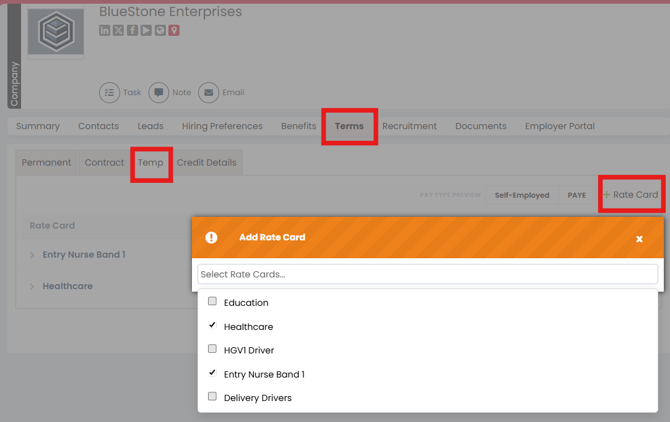
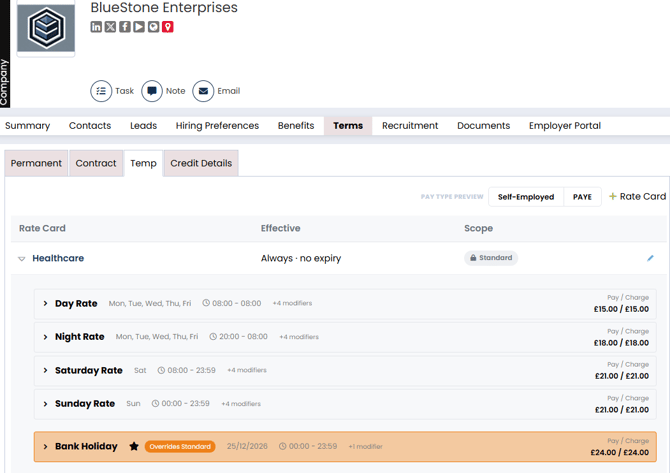
Once added, the Rate Cards are available against the company's Temp Terms.
The Rate Cards contain the Job Codes, rates and configuration established in your Standard Rate Card settings.
Note: Standard Rate Cards must be created centrally before they can be added to a company. See Creating and Managing Standard Temp Rate Cards for instructions.
Using Standard and Custom Rate Cards
When a Rate Card is applied to a company, you can choose whether it remains Standard or becomes Custom.
The difference determines whether the company continues to inherit centrally managed rates.
| Rate Card type | How it works |
|---|---|
| Standard | Uses the centrally configured Rate Card. The inherited configuration is read-only, and applicable updates to Standard Rates flow through automatically. |
| Custom | Allows you to amend the rates, rules and modifiers for that company without changing the centrally configured Standard Rate Card. |
Standard Rate Cards
Keeping a Rate Card as Standard is useful when several clients use the same agreed rates.
Changes made to the central Standard Rate Card will be inherited by companies still using those standard values.
Custom Rate Cards
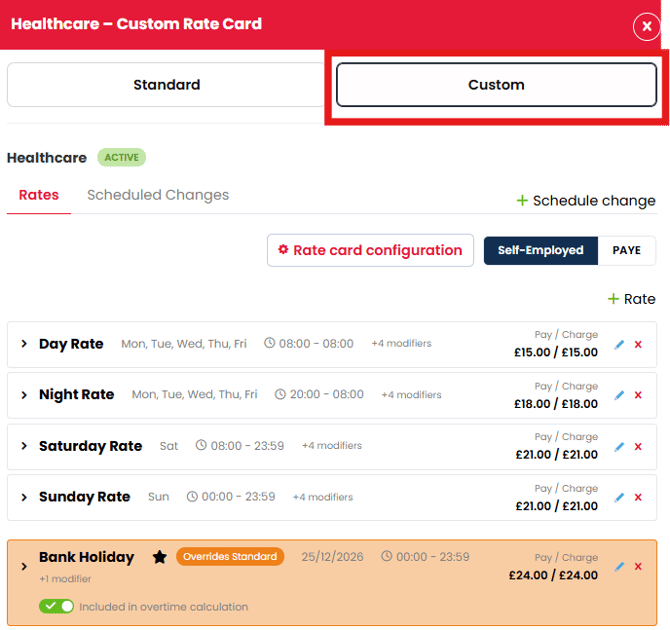
You can hit the Edit icon to amend a rate card on the company record and make it custom.
Choose Custom when a company has negotiated different terms or requires an alternative rate structure.
Customisation allows you to maintain company-specific rates without affecting the Standard Rate Card or other companies using it.
Customising Company Rate Cards
You can customise a company's Rate Card to reflect its agreed pay and charge rates or different working arrangements.
To customise an existing Rate Card:
- Open the relevant Company record.
- Navigate to Terms > Temp.
- Select the Rate Card you want to amend.
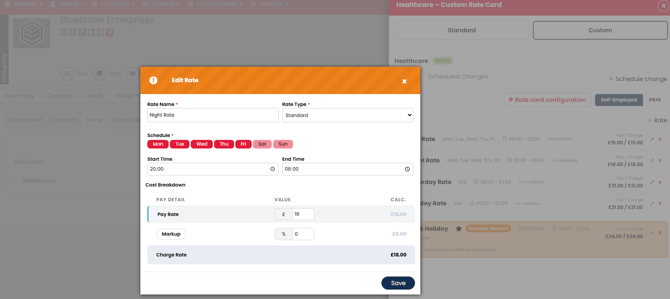
- Change the Rate Card from Standard to Custom.
- Amend the required rates, rules or modifiers.
- Save your changes.
For example, your Standard Rate Card may have the following rates:
| Job Code | Standard Pay | Standard Charge |
|---|---|---|
| Healthcare Assistant | £13.00 | £18.00 |
| Registered Nurse | £22.00 | £30.00 |
A particular company may have negotiated a Registered Nurse charge rate of £32.00.
By customising the company's Rate Card, you can update its Registered Nurse charge rate without changing the central Standard Rate Card or the rates used by other companies.
The values above are illustrative examples.
Important: Customised values are maintained separately from the Standard Rate Card. Review any future updates to your central rates to ensure company-specific terms remain appropriate.
For further information about configuring individual rates, see Creating and Managing Standard Temp Rate Cards.
For details of configuring alternative rates, see Understanding Temp Rate Exceptions and Modifiers.
Managing Rate Cards for Parent and Child Companies
Firefish also supports Rate Card inheritance for companies using a parent and child company structure.
When configuring a child company's Temp Rate Cards, you can choose whether it uses:
- Standard Rate Cards: Rates configured centrally within Company Configuration.
- Parent Company Rate Cards: Rates associated with its parent company.
This allows you to maintain consistent rates across a group of companies without configuring each child company independently.
Example
A recruitment agency works with a healthcare group containing several care homes.
The parent company has an agreed set of pay and charge rates used across the group.
Rather than configuring the same rates individually for every care home, the child companies can be configured to use the parent company's Rate Cards.
If a particular location requires different rates, its Rate Card configuration can be customised.
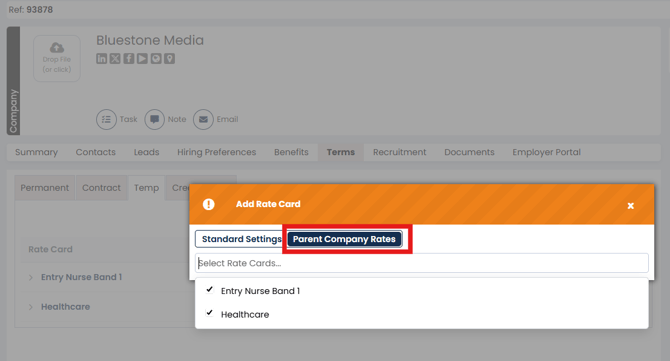
Tip: Before customising a child company's rates, check whether the rates should instead be maintained centrally against the parent company. This helps avoid unnecessary duplication.
Understanding How Rate Changes Cascade
Firefish uses rate inheritance to keep Standard Rate Cards and the companies using them aligned.
When a centrally managed rate is updated, the change flows through to companies still using the inherited Standard Rate.
Where a rate or configuration has been customised, that customised value is retained rather than being overwritten by the central change.
Example: Updating a Standard Rate
You have three companies using a Standard Rate Card with a charge rate of £20 per hour.
- Company A: Uses the Standard Rate.
- Company B: Uses the Standard Rate.
- Company C: Has a Custom charge rate of £23 per hour.
You update the Standard charge rate from £20 to £21 per hour.
| Company | Before | After | Outcome |
|---|---|---|---|
| Company A | £20 | £21 | Inherits the Standard Rate change |
| Company B | £20 | £21 | Inherits the Standard Rate change |
| Company C | £23 | £23 | Retains its Custom Rate |
Example rates are illustrative.
Updating existing shifts
When changing a Standard Rate, Firefish also allows you to control which shifts the updated rate applies to.
| Option | Effect |
|---|---|
| Update from today | Applies the new rate to applicable shifts from today, leaving earlier shifts unchanged. |
| Update from this week | Applies the new rate to applicable shifts from the beginning of the current week. |
| Update all time | Applies the new rate to all applicable shifts, including past and current shifts. |
These options determine the effective period of the rate change, while inheritance determines which companies receive it.
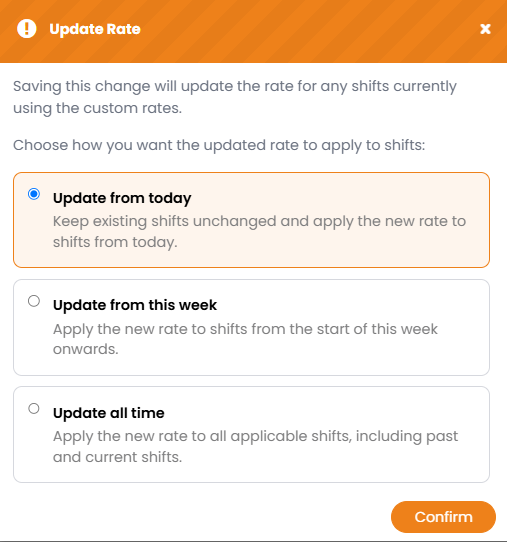
Important: Firefish displays a warning when saving changes that will affect other Rate Cards. Review the warning before confirming, particularly when applying changes to historical shifts.
Frequently Asked Questions
Can I apply the same Standard Rate Card to multiple companies?
Yes. A Standard Rate Card can be applied to multiple companies, allowing them to share centrally maintained rates.
Can I change a company's rates without affecting other companies?
Yes. Change the company's Rate Card to Custom and amend the relevant values. This does not change your centrally configured Standard Rate Card.
Will a Standard Rate change update my companies automatically?
Yes. Companies still using the inherited Standard Rate will receive applicable changes. Customised values are retained.
Can a child company use its parent company's Rate Cards?
Yes. Child companies can be configured to use their parent company's Rate Cards instead of the centrally configured Standard Rate Cards.
Do I need Superuser permissions to edit company Rate Cards?
No additional Superuser permission restriction applies to editing Rate Cards on company records. Superuser permissions are required to create centrally managed Standard Rate Cards.