
Deleting, Archiving, and Unarchiving
Managing candidates effectively is essential to maintaining a clean and compliant database in Firefish. This guide will walk you through the processes of deleting, archiving, and unarchiving candidates, ensuring you understand the key differences and functionalities of each action.
Deleting vs. Archiving
Archiving a candidate keeps their data on the system but removes them from active workflows. When a candidate is archived:
- They no longer appear in live searches or potential matches.
- Their to-do items are closed automatically.
- They retain access to the Candidate Portal and their marketing preferences.
- They are unsubscribed from job alerts and marketing messages (if opted in).
- They are automatically not progressed when applying to any adverts moving forwards.
Archived candidates are reviewed after your data retention period (typically two years), at which point you can decide to delete or keep them.
Deleting a candidate starts a permanent removal process. There is a 48-hour grace period during which you can cancel the request using Unmark for Delete.
After this period, Firefish automatically processes the record. Information removed during processing cannot be recovered.
The information removed depends on whether the candidate has placement history, completed confirmed Temp bookings, or a linked Contact record:
- No information needs to be retained: personal information, documents and Candidate Portal access are removed. An anonymous record remains with a limited history of the deletion.
- Placement or completed Temp booking history is within your retention period: limited information is kept as explained below.
- The candidate is also a contact: the Contact record remains usable, while candidate-only information is removed and the candidate side becomes inactive.
Deleted candidates no longer appear in normal live candidate searches or the active Temp Availability Pool.
Cancelling a Deletion
If you change your mind within the 48-hour grace period, open the candidate’s record and select Unmark for Delete.
After the grace period, this option is no longer available. Any information subsequently removed by the deletion process cannot be restored.
Where Can I Delete a Candidate?
You can both delete and archive candidates from the Delete button on the following screens:
-
Candidate record (in Tasks)
-
Candidate search results
-
Data Retention / Consent / New Registrations to-do lists
And also the Not Progressing button on:
-
Adverts (Applications tab)
Mark a Candidate for Deletion
⚠️ Deleting a candidate permanently deletes most of the candidate's data.
To delete a candidate:
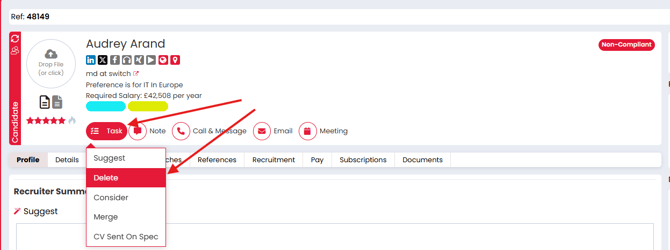
- Open their record, navigate to Tasks, and select Delete.
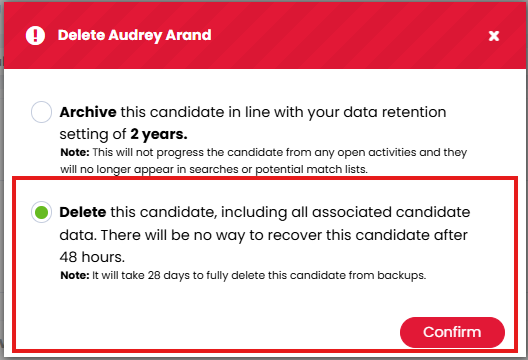
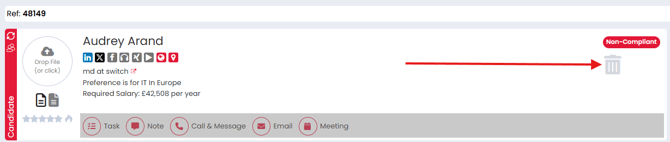
- Confirm the action to mark the candidate for deletion. A bin icon will appear in the header section of their record.
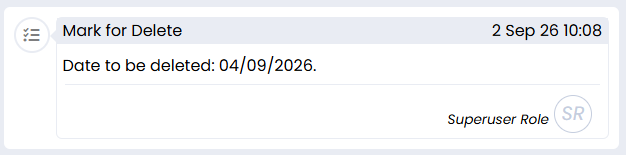
- A "Mark for Delete" Action is also added to the candidate's activity history, which details when they are due for deletion:
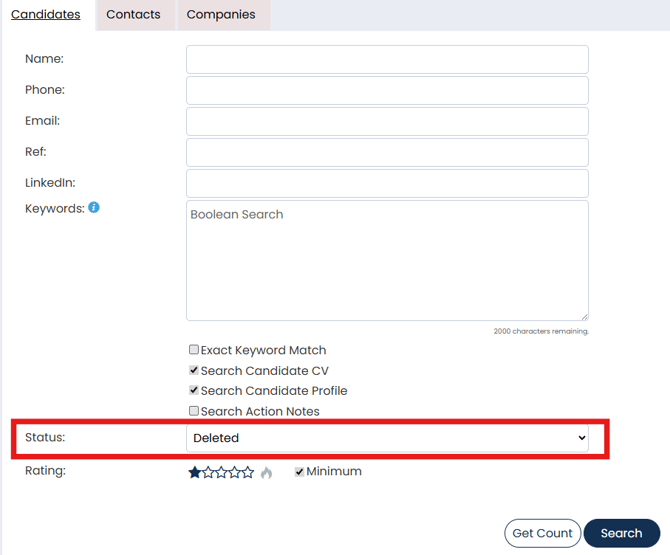
- During the 48-hour grace period, the candidate remains inactive but visible. To find retained candidate records, Super Users can use Deleted or All in the Candidate Search status filter.
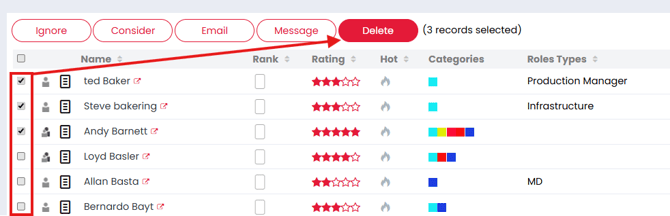
For bulk deletions (e.g., during data cleansing):
- Select multiple candidates from search results or to-do lists.
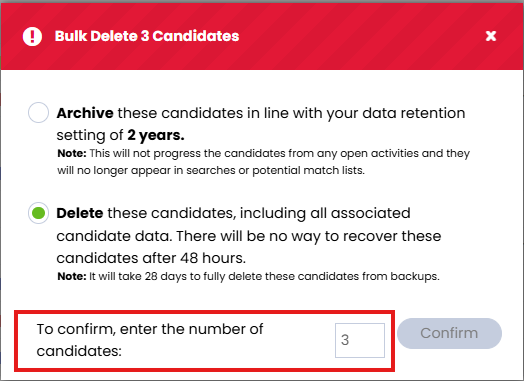
- Confirm the deletion by entering the number of candidates to be deleted, an extra step to prevent accidental bulk deletions.
Unmarking a Candidate for Deletion
After the 48 you will no longer get the "Unmark for Delete" option and the candidate data will be deleted. There is no way to recover the data after this.
If you change your mind within the 48-hour grace period:
- Access the candidate’s record and click Unmark for Delete.
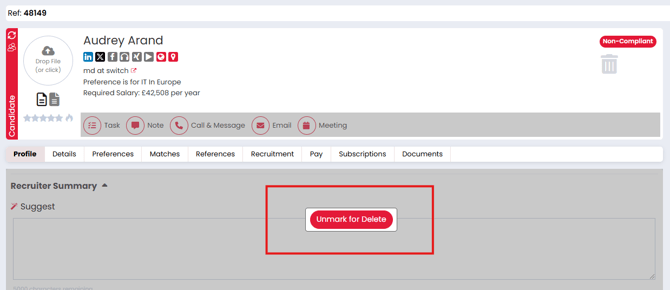
This will restore the candidate to active status. After 48 hours, the deletion process is irreversible, and the data will be permanently erased.
Retaining Data for Offered/Placed/Temp Candidates
When a candidate is marked for deletion, Firefish may keep limited information relating to their Permanent or Contract placements or completed confirmed Temp bookings as part of the required legal basis to retain employment records.
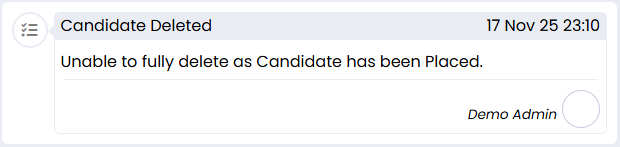
Where a record cannot be fully deleted, its activity history explains the reason.
A Super User can set the retention period under:
Settings → People Configuration → General → Retaining Placed & Temp Candidates
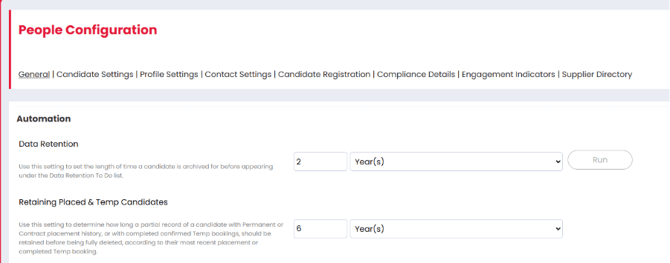
The default is 6 Years. You can change the duration using days, weeks, months or years to match your agency’s retention policy.
This setting applies to candidates marked for deletion. It does not automatically mark all older candidates for deletion, and it is separate from the Data Retention setting used to review archived candidates.
When does the retention period start?
The period is measured from the relevant placement or booking date—not the date the candidate was marked for deletion.
| Type of history | Date used |
|---|---|
| Permanent placement | Placement start date |
| Contract placement | Contract end date, including the applicable extension or termination details |
| Completed confirmed Temp booking | The end date and time of the shift |
Where placement dates are missing, Firefish uses the available fallback dates. For a Contract with no end or termination date, this is its start date, or its creation date if no start date is recorded.
If a candidate has more than one placement or completed confirmed Temp booking, Firefish considers the most recent relevant date.
Example: If your retention period is six years and the candidate’s most recent Contract ended five years ago, the remaining retention period is approximately one year. Marking the candidate for deletion does not start another six years.
What information is retained?
Permanent and Contract placements
During the retention period, limited information can remain, including the candidate’s name, relevant placement history, CV documents and pay details. Bank account details are removed. Employment information is retained only where it matches the placement employer.
The retained name can remain visible against the relevant placement.
Completed confirmed Temp bookings
Where information is retained only because of completed confirmed Temp bookings, the candidate’s personal information is removed and the booking history is shown anonymously.
The retained history includes the Job and Company, shift dates and times, and confirmation that the booking took place. It does not keep the candidate available for new bookings.
Pending, Offered, Accepted and Declined booking associations are removed during deletion. The Job, shifts and other candidates’ bookings are unaffected.
Candidates who are also contacts
The Contact record and shared information needed to use it are retained. Deleting the candidate does not delete the contact or their Employer Portal access.
To find retained candidate records, Super Users can use Deleted or All in the Candidate Search status filter.
What happens when the retention period ends?
Firefish automatically reassesses the record and removes information that no longer qualifies for retention. You do not need to process each candidate again manually.
If another placement or completed confirmed Temp booking still falls within the retention period, the appropriate limited information remains. If the person is also a contact, their Contact record continues to be retained.
Archiving a Candidate
Archiving candidates is a simple process:
- Go to the candidate’s record, click Tasks > Delete, and select Archive.
- Provide a reason for archiving, add notes if necessary, and confirm the action.
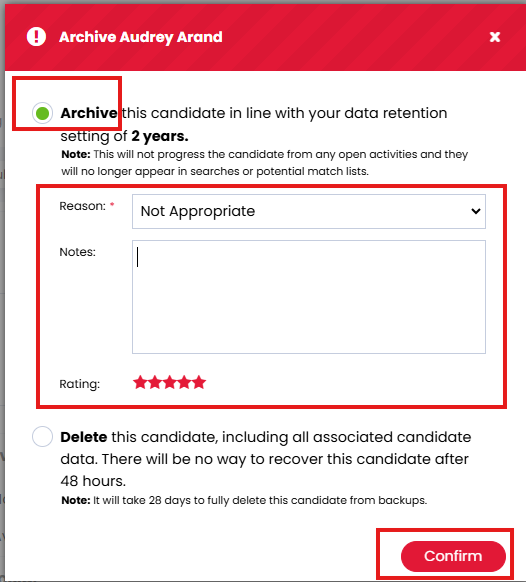
Archived candidates retain their data, including contact details and portal access. They can still apply for jobs but will be automatically marked as “Not Progressing.” Archived candidates can also re-engage by logging into the portal and applying for roles.
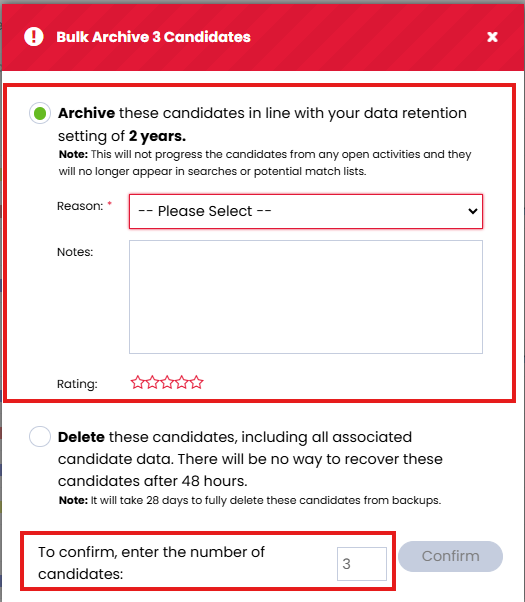
For bulk archiving:
- Select multiple candidates from the search results or to-do lists.
- Provide a reason and optional notes, confirm the number of records to archive, then confirm the action.
Unarchiving a Candidate
To unarchive a candidate:
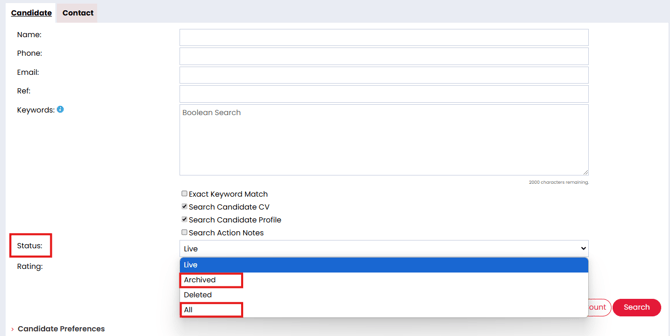
- Search for the candidate, ensuring the Archived or All status filter is selected.
- Open their record and click Unarchive.
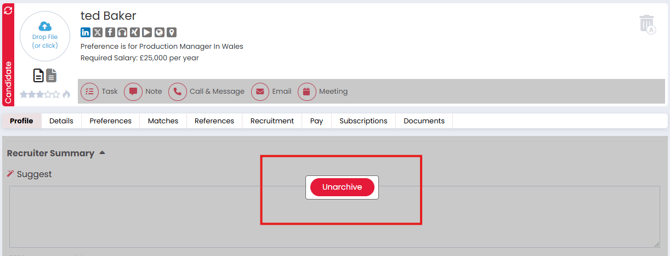
This action restores the candidate’s active status but doesn’t undo any changes made during the archiving process (e.g., closed to-do items).
Additional Information
Candidate-Initiated Deletion Requests
Candidates with portal access can request deletion via the Request to Remove button found in the 'My Account' section of the candidate portal. A notification email will then be sent from the system email address to the email address in your Company Information section.
Troubleshooting: Why is the Delete Option Disabled?
If the delete option is greyed out, it’s likely due to insufficient user permissions; Contact your Superuser to enable this action.
If the candidate is actively engaged in a Contract Placement or Temporary Booking, this will also prevent a candidate from being deleted, and the modal will show this is a blocking reason.