Job Workflows
Temp Workflow Improvements
Available on: Basic, Professional and Enterprise
We’ve made several improvements to the Temp Workflow to make scheduling faster and more intuitive.
Recurring Shift Assignment – Smarter Default
When assigning a candidate to a recurring shift, the assignment window now defaults to “This and all future occurrences.”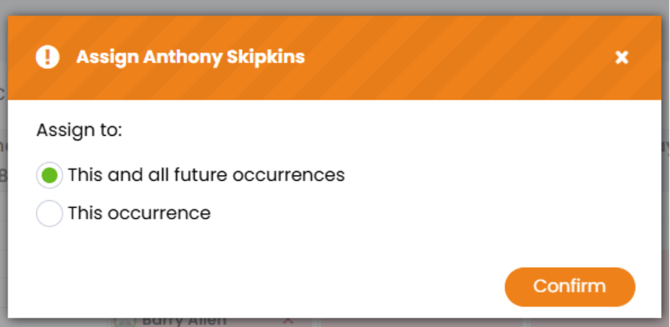
What this means for you:
-
Reduces the risk of accidentally assigning a candidate to just one shift.
-
Speeds up bulk shift planning.
-
Makes recurring bookings more efficient.
Improved Open Behaviour (Calendar & List Views)
We’ve improved how items open from both the Calendar and List views.
What’s changed:
-
A more consistent experience when opening items in the side panel or in a new tab.
-
Reduced confusion when switching between different workflow views.
This creates a smoother and more predictable workflow when managing shifts.
Clearer Leaver & Non-Compliant Indicators
We’ve updated the status icons used in the Temp Workflow.
What’s improved:
-
Leaver and Non-Compliant indicators are now clearer and easier to identify.
-
Tidier icon display for better visibility at a glance.
This helps you quickly understand candidate status without needing to open each record.
For more guidance on managing shifts, see:
https://fishtank.firefishsoftware.com/scheduling-candidates-in-your-shift-workflow
Web
Events Plugin Now Available on Tetra Template
Available on: Professional and Enterprise
Clients using the Tetra website template can now make use of a fully styled Events Plugin.
The plugin has been designed to match the existing Tetra styling for a consistent user experience.
What’s included:
-
A dedicated Events Landing Page
-
A List view for upcoming events
-
A Featured Events list
This allows you to promote events directly on your website in a clear and professional format.